If you've sat through a CMMC assessment, a cyber insurance renewal, or a customer security questionnaire in the last year, you've noticed something: they all ask about the same things.
Not roughly the same things. The same five things, worded slightly differently depending on who's asking.
CMMC checks them. Your carrier checks them. And increasingly, your customers check them too, especially if they're a prime contractor, a regulated buyer, or anyone whose compliance team has woken up to the reality that their supply chain is their attack surface.
After looking at manufacturing breach data from IBM X-Force's 2026 Threat Intelligence Index, Palo Alto Networks' Unit 42 Incident Response Report, and the carrier underwriting requirements documented by Marsh McLennan and Coalition, the pattern is clear. Here are the five controls that matter, why they matter, and where most manufacturers are falling short.
1. MFA: Not Just Enabled. Enforced. And Increasingly, Phishing-Resistant.
Multi-factor authentication has been on every checklist for years. Now, carriers and auditors no longer accept "yes, we have MFA" as a passing answer. They want to know where it's enforced, whether it can be bypassed, and what type it is.
The distinction between "enabled" and "enforced" matters more than most IT teams realize. Enabled means MFA is available as an option. Enforced means nobody can authenticate without completing the MFA challenge. If an employee can choose to skip it, or if conditional access policies allow fallback to password-only from certain locations, you have a gap that both carriers and attackers will find.
The newer requirement, showing up on 2026 carrier applications and CMMC Level 2 assessments: phishing-resistant MFA. Standard push notifications and SMS codes can be intercepted by Adversary-in-the-Middle attacks in real time. FIDO2 security keys and passkeys use cryptographic authentication that can't be relayed because the verification happens between the physical device and the service directly.
For manufacturers with plant-floor workers who share workstations, rolling this out takes planning. It's not a weekend project.
The most common gap we see: MFA is enforced on Microsoft 365 but not on the VPN. The attacker doesn't need to get into email if they can get into the network.
2. EDR on Every Endpoint: Including the Ones Nobody Thinks About
Endpoint Detection and Response is the minimum standard now. Not antivirus. EDR. Every carrier application makes the distinction explicit, and most auditors will flag traditional antivirus as insufficient.
The difference: antivirus catches known threats by matching signatures. EDR monitors behavior patterns and can detect and isolate a compromised machine before the attacker moves laterally. In practice, this means EDR catches the 10pm lateral movement attempt that antivirus wouldn't notice until the ransomware payload executes three hours later.
The coverage requirement is where manufacturers get tripped up. "Every endpoint" means every device that touches your network. Not just the office laptops and desktops. Every server, every remote-access machine, and every device on the production floor that's connected to the business network.
For manufacturers running older operating systems on production-adjacent machines, some of those devices genuinely can't support a modern EDR agent. That's fine, but you need a documented exception with compensating controls. "We couldn't install it" is not a compensating control. "This device is segmented onto an isolated VLAN with no internet access and monitored by network-level detection" is.
The most common gap: EDR is on workstations but not on servers, and not on the HMI or engineering workstations that sit at the boundary between IT and OT.
3. Backups: Immutable, Tested, and Documented
This is the control that has evolved the most in the last two years. The bar has moved from "do you have backups" to "can you prove they work, and can an attacker destroy them."
The reason for the shift is simple math. According to multiple industry sources, over 90% of ransomware attackers now attempt to compromise or encrypt backups as part of the attack. If your backup infrastructure is accessible from the same network with the same credentials as your production environment, the attacker takes it out in the same sweep. Your recovery plan was sitting in the blast radius.
Carriers now want to see three things: that backups are immutable or air-gapped (meaning they can't be modified or deleted by anyone who has compromised your production environment), that they're stored off-network, and that you've completed a documented restore test within the last 90 days.
Not a backup job log showing the job completed. A restore test. Pull the data back, confirm it's intact, screenshot the process, timestamp it. That documentation is what separates a payable claim from a denied one.
The most common gap: nightly backup jobs run successfully and nobody has performed an actual restore test in over a year. The backup job completing is not evidence that the data is recoverable.
Free Download
The Manufacturer's Co-Managed Security Checklist
Five controls. Your team vs. your partner. One page.
4. Admin Rights: Reviewed, Minimized, and Documented
This is the control that feels the least urgent until you see how attackers actually operate. In nearly every manufacturing breach we've looked at, privilege escalation through over-provisioned admin accounts was part of the attack chain.
The pattern: an attacker gets initial access through a compromised credential or a phishing email. They land on a workstation with standard user rights. Then they discover that the IT admin account has a weak password, or that several employees have local admin rights that were granted three years ago for a software install and never removed, or that a former employee's account is still active with domain admin privileges.
From there, the attacker elevates to admin, accesses the domain controller, and has the keys to everything.
Carriers and auditors want to see that admin rights are actively managed: regular reviews (quarterly at minimum), immediate removal for departing employees, and a documented process for granting elevated access that doesn't involve "just give them admin so it works."
The most common gap: admin rights were granted for convenience at some point in the past and have never been formally reviewed. Nobody knows exactly who has admin access or why.
5. Patch Cadence: Including the Devices Nobody Patches
Servers and workstations generally get patched on a regular cycle. Patch management has been a standard IT practice for decades, and most organizations with any level of IT maturity handle this reasonably well.
The gap is in everything else. Firewalls, VPN concentrators, switches, access points, and OT-adjacent network devices. These are the systems that sit at the perimeter of your network, that are often directly accessible from the internet, and that attackers specifically target for initial access.
CVE-2021-22681 (the Rockwell Logix controller vulnerability that Iranian-affiliated actors targeted in early 2026) has been known since 2021. Five years. And thousands of devices remain unpatched and internet-facing. That's not an exotic zero-day attack. That's a known vulnerability on an unpatched device that was reachable from the public internet.
Carriers want to see a documented patch cadence that covers all device types, not just servers and workstations. If your firewall firmware is two versions behind, or your VPN concentrator hasn't been updated in 18 months, that's an active exposure that will show up on a carrier's external scan.
The most common gap: servers are patched monthly, but network appliances were last patched 12 to 24 months ago because "they're working fine and we don't want to break anything."
The Pattern That Matters
None of these five controls require exotic technology or massive budgets. What they require is consistent process, documentation, and someone who's tracking whether the work is actually getting done.
That last part is where the co-managed model fits for manufacturers with internal IT staff. Your IT person handles the day-to-day: distributing hardware tokens, coordinating maintenance windows, removing departed employees. A co-managed partner handles the parts that require specialized tools and continuous monitoring: configuring conditional access, running 24/7 EDR, managing immutable backup infrastructure, conducting quarterly audits, and producing the documentation that carriers and auditors want to see.
Neither side can do it alone. The internal person knows the business and the people. The partner knows the threat landscape and the compliance requirements. Together, the five controls get covered. Separately, at least two of them are always lagging.
We put together a one-page checklist that maps each of these five controls to what your internal team should own versus what a co-managed partner typically handles. It's specific to manufacturers and it's free.
Walk Through It Together
Score Results Review in 20 Minutes
Go control by control. Find out where you're solid and what to fix first.
There's a version of this article you've already read. It's the one where someone tells you MFA is important, backups matter, and you should talk to your broker before renewal. That version is useless to you. Here's the version that isn't.
In 2024, according to the National Association of Insurance Commissioners, nearly three times as many cyber insurance claims were closed without payment as those that were paid out. That's 28,555 claims denied versus 9,941 paid. For excess cyber policies, the ratio was worse: unpaid claims outnumbered paid ones by more than 20 to 1.
The insurance industry collected $16.3 billion in cyber premiums in 2025. That's nearly triple what it was five years ago. And they still lost money. Claims payouts reached $7.8 billion, ransomware incidents jumped 126% in Q1 2025 alone, and supply chain breaches now account for nearly 30% of all incidents.
Carriers responded the way you'd expect: they stopped trusting anyone.
Free Download
Cyber Insurance Renewal Readiness Checklist
See where you stand against what carriers are requiring in 2026. Takes about five minutes.
If you renewed a cyber policy before 2024, you probably remember the application as a formality: a few pages, some yes/no checkboxes, maybe even a conversation with your broker. The carrier took you at your word.
That's over. According to Marsh McLennan's 2025 Cyber Insurance Market Report, 99% of cyber insurance applications now include specific questions about MFA implementation. Not "do you have MFA," but "is MFA enforced across email, VPN, RDP, cloud applications, and all admin accounts, and can you provide documentation."
Some carriers are running technical scans of your external network before they'll even issue a quote. They're checking for exposed ports, unpatched systems, misconfigured DNS, and known vulnerabilities. This happens before you've signed anything.
The questionnaire is now an audit. And if your answers don't match what they find, you either don't get coverage, or you get coverage that won't pay when you need it.
What's worse, given the data reported by NAIC, unless you shore up and document everything to fit the requirements, even if you get renewed, your claim will be denied should you file one.
The Five Controls That Actually Matter
Every carrier's requirements are slightly different. But after looking at what's showing up consistently across major underwriters in 2026, there are five controls that appear on virtually every application.
1. Phishing-Resistant MFA, Not Just MFA
This is the biggest change from even a year ago. Standard MFA, the kind that sends a push notification to your phone or a code via SMS, is no longer considered sufficient by many carriers. The reason: Adversary-in-the-Middle attacks have gotten good enough to intercept and replay MFA tokens in real time. An employee clicks a convincing phishing link, enters their credentials, approves the push notification, and the attacker captures the session token before it expires. MFA was technically in place. It still failed.
Carriers are now asking specifically about phishing-resistant MFA, which means FIDO2 security keys or passkeys. These use cryptographic authentication that can't be intercepted because the authentication happens between the physical key and the service, not through a channel an attacker can sit in the middle of.
For manufacturing environments, this is a significant lift. You likely have employees who don't sit at desks, who share workstations, who access systems from the plant floor. Rolling out FIDO2 keys to that population takes planning. Start now if your renewal is in the next six months.
Coalition's 2024 Cyber Claims data found that 82% of denied claims involved organizations without fully implemented MFA. That single statistic should inform how you prioritize your next 30 days.
2. EDR on Every Endpoint, Not Just the Office Machines
Endpoint Detection and Response EDR) is the successor to traditional antivirus, and carriers now distinguish between the two explicitly. Antivirus looks for known bad files. EDR monitors behavior, detects anomalies, and can isolate a compromised machine before the attacker moves laterally through your network.
The key word carriers use is "every endpoint." Not just the laptops and desktops in the front office. Every server, every remote machine, every device that touches your network. For manufacturers, this includes machines in the shop that might be running older operating systems that don't support modern EDR agents, which creates a documentation challenge: you need to show the carrier either that EDR is installed or that you have a documented exception with compensating controls.
If a breach occurs and the carrier finds that the endpoint where the attacker gained initial access didn't have EDR, your claim is in trouble.
3. Immutable, Tested Backups
This one has evolved the most. Two years ago, carriers wanted to know if you had backups. Last year, they wanted to know if you tested them. This year, they want to know if your backups are immutable, meaning they can't be modified or deleted by an attacker who has gained access to your network.
The reason for the shift: 94% of ransomware attackers now attempt to destroy or encrypt backups as part of the attack first. If your backup infrastructure is connected to the same network and accessible with the same credentials as your production environment, the attacker takes it out along with everything else. Your "backup" was sitting in the blast radius the whole time.
Carriers want to see air-gapped or immutable backups stored off-network, with documented restore tests completed within the last 90 days. Yes, actual restore tests, with screenshots and timestamps, proving you pulled data back and it was intact.
For a manufacturer running 24/7 production, testing a full restore is operationally disruptive. Do it anyway. Do it on a weekend. Document it thoroughly. That documentation is what stands between you and a denied claim.
4. Written Incident Response Plan
Not "our IT guy knows what to do." A written plan. With named roles, contact information, escalation procedures, communication templates, and a decision tree for whether to pay a ransom or attempt recovery.
Carriers want to see that you've thought about this before it happens, because the data overwhelmingly shows that organizations without written IR plans take longer to contain breaches, lose more data, and incur higher costs. The plan doesn't need to be 50 pages. It needs to exist, it needs to be current, and your team needs to know where it is.
5. Vendor Risk Documentation
This is the newest addition to the standard underwriting checklist, and it catches a lot of manufacturers off guard. Carriers are now asking whether you've evaluated the security posture of third-party vendors who connect to your systems. Your ERP provider, your MES vendor, your managed print service, your third-party IT support, your payroll processor: anyone with network access or access to sensitive data.
The logic is straightforward. Third-party vendor incidents now account for roughly 20% of all cyber claims. An attacker who compromises your vendor gets a trusted connection into your network. If you can't show that you've assessed those vendors and documented their security controls, you're carrying a risk that carriers are increasingly unwilling to cover.
What "Denied" Actually Looks Like
The denial statistics are alarming, but they don't tell the full story of how denial happens. It's rarely a carrier saying "no" at renewal. More often, it plays out like this:
You have a policy. You've been paying premiums for years. An incident occurs. You file a claim. The carrier sends an investigator. The investigator finds that MFA was enabled on email but not on the VPN. Or that backups existed but hadn't been restore-tested in eight months. Or that EDR was on the office machines but not on the server where the attacker gained access.
The carrier points to the application where you attested that these controls were in place. They call it material misrepresentation. The claim is denied.
This isn't hypothetical. In the International Control Services v. Travelers case, coverage was denied after Travelers discovered that MFA was implemented on the firewall but not on the remote access system the attackers actually used. The business thought they had MFA. They did, technically. Just not where it mattered.
S&P Global Ratings has forecast a 15 to 20% premium increase in 2026 following two years of declining rates, driven by the ransomware surge and the credential theft explosion. The carriers who were competing on price two years ago are now competing on selectivity. They want fewer, better-prepared clients, and they're willing to let the rest go.
What This Means for Manufacturers Specifically
Manufacturing sits in a uniquely difficult position on cyber insurance. It is, according to IBM's X-Force Threat Intelligence Index, the most attacked industry in the world for the fifth consecutive year. Manufacturing production environments run legacy systems that can't always support modern security tools. Your OT networks often share infrastructure with your IT networks. Your downtime costs are immediate, measurable, and significant.
Carriers know all of this and they price it accordingly. Average cyber insurance premiums for mid-size manufacturers ($10M to $50M revenue) now run $3,500 to $10,000 per year, with larger operations paying $10,000 to $30,000 or more. And those are the premiums for manufacturers who can demonstrate the five controls above. For those who can't, the number goes up fast, or the application comes back declined.
The average ransomware payment in manufacturing exceeded $400,000 in 2026, with total event costs (including recovery, business interruption, and legal exposure) commonly reaching $1 million to $5 million for mid-size operations. Your carrier knows this number because they've paid it. They don't want to pay it again for a business that couldn't prove MFA was enforced.
There's also a CMMC angle here that's worth mentioning. If you're a manufacturer in the defense supply chain, CMMC 2.0 enforcement begins in November 2026. Many of the controls CMMC requires overlap directly with what carriers are asking for. Getting your cyber insurance documentation right is essentially doing double duty: it positions you for both renewal and compliance.
The 2026 Coverage Exclusion Problem
Here's the development that should genuinely concern every business owner reading this: carriers are now adding explicit coverage exclusion clauses for incidents that could have been prevented with basic controls.
This goes beyond denying claims after investigation. This is language written into the policy itself that says: if the incident was caused by a failure to maintain the controls you attested to, the policy does not apply.
The practical effect is that your premium buys you less than it used to. You're paying for a policy that only covers you if you were already doing everything right. If you weren't, you're self-insured whether you know it or not.
What to Do in the Next 30 Days
If your renewal is in the next six months, here's the sequence that matters:
Week 1: MFA Audit Document everywhere MFA is currently enforced. Every system, every access point. Identify gaps. If you're still on SMS or push-only MFA for privileged accounts, start the migration to phishing-resistant MFA now. Order FIDO2 keys this week if you don't have them.
Week 2: EDR Inventory Pull a report from your EDR vendor showing every device covered. Cross-reference it with your full device inventory. Identify any machines that don't have EDR and determine whether they can support it. For those that can't, write a documented exception with compensating controls.
Week 3: Backup Restore Test Schedule and execute a full restore test. Not a backup verification, a restore. Pull the data back, confirm it's intact, screenshot the result, timestamp it. Store the documentation somewhere your IT team and your broker can access it.
Week 4: Documentation Package Compile your incident response plan (write one if you don't have one), your vendor access list with security assessments, your MFA coverage map, your EDR deployment report, and your backup test results into a single folder. This is your evidence package. When the carrier asks, you hand them this.
The Uncomfortable Bottom Line
Cyber insurance in 2026 is not a safety net. It's a qualification process. The carrier is not your advocate, your partner, or your advisor. They are a business that has lost billions on claims from businesses that weren't prepared, and they have restructured their entire underwriting model to make sure they don't lose that money again.
The businesses that will maintain affordable coverage are the ones that can prove, with documentation, that they had the right controls in place before the incident occurred. Not after. Not during. Before.
Everything else is a policy that looks good in a drawer and fails when you need it.
If you're a manufacturer in Southeast Wisconsin and you'd rather have someone walk through this with you than figure it out from a blog post, we can do a free 20-minute cyber insurance readiness review. We'll tell you where you stand and what to fix first, and if everything checks out, we'll tell you that too.
Rather Talk It Through?
Book a Free 20-Minute Readiness Review
We will look at where you stand against what carriers are requiring and tell you what to fix first. No pitch, no obligation.
The cybersecurity threats Wisconsin manufacturers face are no longer limited to stolen files or suspicious emails. When ransomware hits a production environment, it can escalate fast: CNC machines stop receiving job files, shipping slows down, ERP data becomes unavailable, supervisors lose visibility into work orders, and the plant floor starts making decisions with incomplete information.
That is why manufacturing has become such an attractive target. Attackers know many manufacturers run lean IT teams, older production systems, remote vendor connections, and tight delivery schedules. A bank can freeze transactions. A manufacturer may have to stop a line.
National threat data now backs up what many Wisconsin IT directors already feel: manufacturing is under heavier pressure than most industries. IBM reported thatmanufacturing was the most attacked industry for the fourth consecutive year in 2024, with the highest number of ransomware cases among industries it tracked.
The Numbers: What the Threat Data Means for Wisconsin Manufacturers
The clearest takeaway from the 2023–2025 data is this: ransomware is now an operations problem, not just an IT problem.
Dragos documented 1,693 ransomware attacks against industrial organizations in 2024, an 87% increase over the prior year, and found that 75% of ransomware incidents it responded to caused a partial OT shutdown while 25% caused a full OT shutdown.
For a Wisconsin manufacturer, that can mean delayed shipments, overtime recovery, missed contract obligations, and customer confidence problems.
Verizon’s 2025 manufacturing breach data also shows why mid-sized manufacturers are exposed. In manufacturing breaches, ransomware appeared in 47% of cases, stolen credentials in 34%, exploited vulnerabilities in 23%, and phishing in 19%. Verizon also found that more than 90% of breached manufacturing organizations in its sample were SMBs with fewer than 1,000 employees.
That matters because many Wisconsin manufacturers operate exactly in that range: large enough to be valuable, but not large enough to run a 24/7 security operations center. Zscaler’s 2025 ransomware research found manufacturing was the most frequently hit sector in its data, with 1,063 attacks over the prior year, while U.S. victims accounted for 50% of ransomware attacks globally.
Locally, the 2023 ransomware attack involving Fincantieri Marinette Marine showed what that risk looks like on the shop floor. USNI News reported that the attack affected servers used to feed instructions to CNC manufacturing machines and knocked some systems offline for several days.
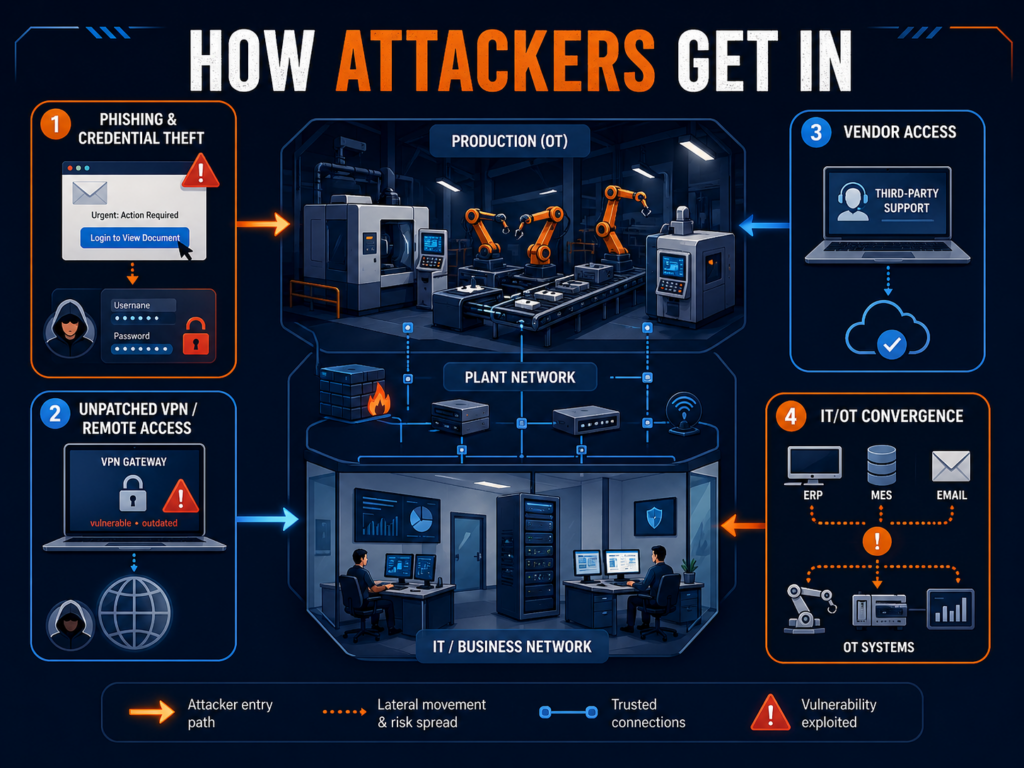
How Attackers Get In
Most manufacturing ransomware attacks do not start with movie-style hacking. They start with access that should have been harder to use, easier to monitor, or closed months ago.
1. Phishing and Credential Theft
A phishing email in a manufacturing business rarely looks like a generic scam. It may look like a supplier invoice, a freight update, a customer drawing, a quote request, or a Microsoft 365 login prompt sent to a plant manager rushing between meetings.
Once attackers capture a password, they try to log in like a real employee. IBM reported that stolen credentials surged 71% year over year and represented 30% of incidents it responded to in 2023, tied with phishing as the top infection vector.
In a plant environment, that one login can lead to email access, file shares, ERP systems, CAD files, or maintenance documentation. If multi-factor authentication is missing from VPN, admin accounts, or email, the attacker’s job gets much easier.
2. Unpatched VPN and Remote Access
Manufacturers rely on remote access for good reasons. Engineers connect after hours. Vendors support equipment. IT teams troubleshoot without driving to the plant. The problem is that VPNs, firewalls, and remote access portals are some of the first doors attackers check.
Verizon’s 2025 SMB snapshot noted that exploitation of vulnerabilities has become the most common initial access vector in ransomware breaches, driven heavily by attacks on perimeter devices.
For manufacturers, the risk is not just “someone got into the network.” The risk is that an old VPN account, unpatched firewall, or shared vendor login gives an attacker a path toward the systems production depends on.
3. Vendor Access
Manufacturing runs on outside access: machine vendors, ERP consultants, managed software providers, maintenance contractors, logistics platforms, and sometimes customers with portal access. Each relationship may be necessary. Each one also creates a door.
The issue is usually not that vendors are careless. It is that access is often granted once and reviewed rarely. A vendor account may stay active after a project ends. A shared login may exist because “that’s how the machine vendor set it up.” A remote support tool may be installed on a workstation nobody has inventoried.
When attackers find those paths, they do not need to break down the front door. They walk in through a service entrance.
4. IT/OT Convergence
The phrase OT IT security manufacturing sounds technical, but the business issue is simple: the office network and production network are now more connected than they used to be.
ERP talks to scheduling. Scheduling talks to production. Engineers push files to machines. Supervisors pull reports from plant-floor systems. Remote monitoring tools collect equipment data.
That connectivity helps manufacturers move faster, but it also gives attackers more ways to turn an IT incident into an operations event. The Fincantieri Marinette Marine incident is a practical example: the impact was not limited to email or back-office disruption; it touched networked operations tied to CNC workflows.
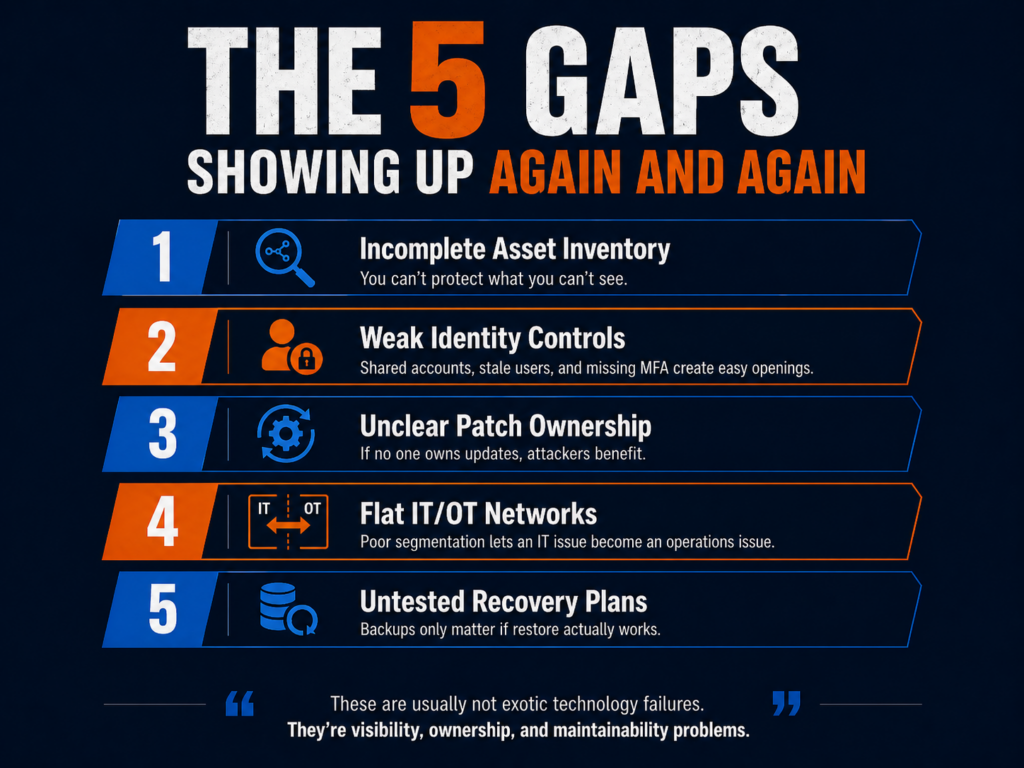
The 5 Gaps Showing Up Again and Again
The pattern in the data is not that manufacturers are being beaten by exotic attacks. The pattern is that attackers keep finding the same gaps: access, patching, documentation, segmentation, and recovery.
“The future of the Industrial Heartland depends on its ability to defend the digital code that now governs its physical machines.”
Here are the five gaps Wisconsin manufacturers should pay attention to first.
1. Incomplete asset inventory.
You cannot protect what you cannot see. Many manufacturers know their servers and laptops, but not every vendor tool, engineering workstation, old switch, remote access appliance, or production-connected PC.
2. Weak identity controls.
Shared accounts, stale users, missing MFA, and standing admin rights give attackers room to move. This is especially risky for executives, IT admins, engineers, and vendor accounts.
3. Unclear patch ownership.
IT may patch Windows systems, but who owns firmware, firewalls, VPNs, HMIs, PLC support stations, and vendor-managed equipment? When nobody owns the patching calendar, attackers benefit.
4. Flat networks between IT and OT.
If ransomware can spread from a compromised office workstation into production-adjacent systems, the business has a segmentation problem. Segmentation is not about making the plant harder to use. It is about making a bad day smaller.
5. Untested recovery plans.
Backups are helpful only if they restore quickly and completely. Cyber insurers and customers increasingly expect evidence: restore tests, logs, incident response plans, and documented roles. Current cyber insurance renewal guidance, for example, focuses on MFA, EDR, backup restore testing, and evidence gathering as practical readiness steps.
For defense suppliers, this also connects to compliance. The Department of Defense CMMC program rule became effective December 16, 2024, and phased CMMC implementation began November 10, 2025. For aCMMC Wisconsin manufacturer, cybersecurity documentation is no longer just a best practice. It can affect contract eligibility.
What IT Directors Are Doing About It
Many Wisconsin manufacturers do not need to replace their IT teams. They need to stop asking a small internal team to do every job at once.
That is where the co-managed IT model is gaining traction. Internal IT keeps ownership of the business: users, systems, plant priorities, ERP projects, production needs, and leadership communication. A co-managed cybersecurity partner adds the pieces that are hard to staff internally, such as continuous monitoring, patch compliance tracking, endpoint detection, log review, incident response planning, backup validation, and security documentation.
This model works well for manufacturers because it respects how plants operate. Production cannot wait for a generic enterprise security program. IT needs help that fits maintenance windows, vendor realities, older systems, and uptime requirements.
The best co-managed relationships also produce evidence. That matters for cyber insurance, customer audits, CMMC readiness, and executive reporting. Your co-managed IT partner can provide you with help and documentation around MFA, role-based access, incident response plans, backup testing, vendor controls, and any other cybersecurity policy controls are needed. Here you can find anUltimate Compliance Checklist we put together for Milwaukee businesses.
The Warning Is Clear, but So Is the Path Forward
The 2023–2025 threat data tells a clear story: manufacturers are high-value ransomware targets because downtime hurts immediately. For Wisconsin manufacturers, this is not a distant national trend. The local and sector-level evidence shows attackers are already focused on production-heavy environments, remote access, stolen credentials, vendors, and IT/OT weak spots.
The good news is that the biggest improvements are practical. Start with visibility. Lock down identity. Patch the systems attackers actually use to get in. Segment production from office IT where it matters. Test recovery before a crisis. Document the work so leadership, insurers, auditors, and customers can see progress.
AI governance for manufacturing security is not a future planning topic anymore. It is already showing up in the daily habits of engineers, estimators, production managers, buyers, HR teams, and customer service staff.
The warning sign came early. In 2023, Samsung reportedly discovered that employees had entered sensitive company information into ChatGPT, including source code used to debug semiconductor systems and internal meeting content. Cyberhaven’s analysis later cited that incident as an example of what happens when helpful employees use public AI tools before policy catches up.
For a manufacturer, the equivalent is not hard to picture.
An engineer pastes a customer drawing into ChatGPT and asks it to summarize the tolerances. A project manager uploads contract language to generate a supplier checklist. A defense subcontractor copies Controlled Unclassified Information into an AI tool to rewrite a status update. A maintenance technician uses an AI browser extension to troubleshoot a recurring equipment fault and accidentally exposes production data.
Workers are not out to cause a breach, they are just trying to move faster.
That is the problem. AI is already in the workflow, but many IT policies still treat it like an optional tool instead of a new data path.
The AI Tools Already in Your Environment
Most manufacturers do not have one AI problem. They have three.
1) Sanctioned AI (IT knows about it)
This is usually Microsoft Copilot (or “Copilot Chat”) because it’s bundled into daily work: Teams, Outlook, Word, Excel.
The good news: Microsoft positions Microsoft 365 Copilot as operating within the Microsoft 365 service boundary, and states prompts/responses and Microsoft Graph data aren’t used to train the underlying foundation models.
The catch: “inside the boundary” doesn’t automatically mean “safe for your business.” If you’ve got overshared SharePoint libraries, messy permissions, weak labeling, or no retention plan for Copilot interactions, Copilot can still surface things to people who shouldn’t see them (because they already had access somewhere).
Translation: Copilot can amplify whatever content hygiene you currently have—good or bad.
2) Unsanctioned AI (IT doesn’t know about it)
This is where things get spicy:
ChatGPT / Claude / Gemini accounts created with personal emails
“Just one quick question” to a public AI website
AI browser extensions that read pages, emails, or clipboard content
Consumer “meeting notes” tools used for Teams/Zoom recaps
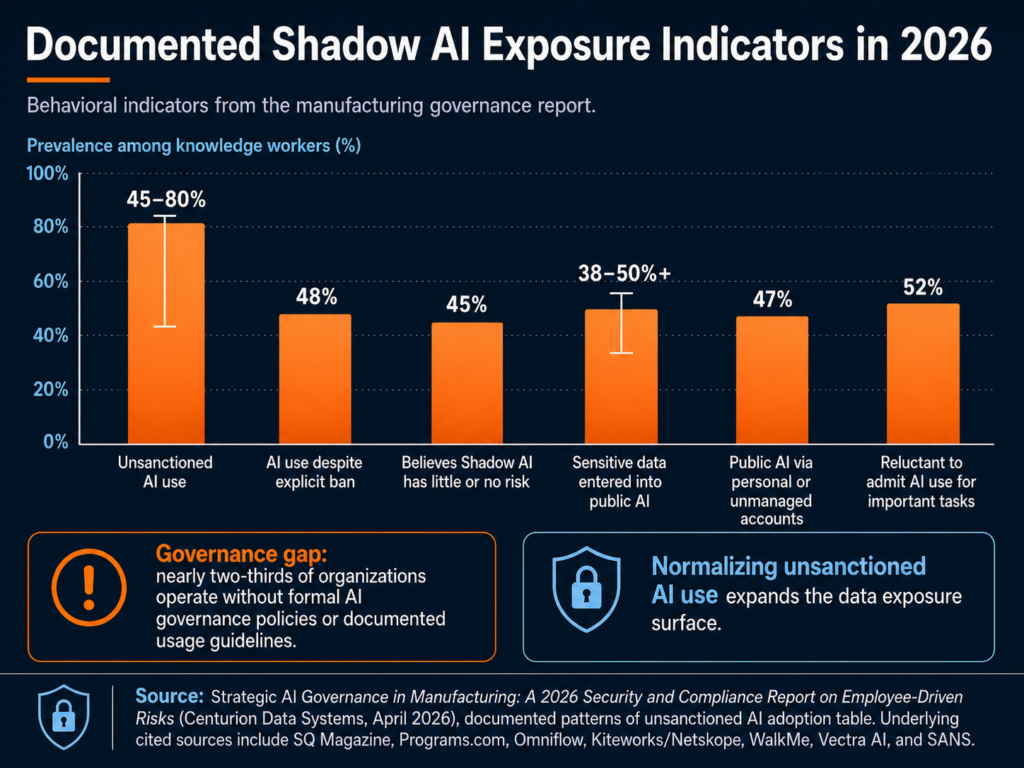
In manufacturing terms, 11% isn’t “a few mistakes.” It’s a steady drip of drawings, supplier details, quotes, quality issues, and customer conversations—leaving your environment one paste at a time.
3) Embedded AI (it shows up inside other tools)
Even if you block public chatbots, AI can still be “baked into” tools you already run:
ERP “AI insights” features
Maintenance diagnostics that use AI to predict failures
AI-assisted design features in engineering software
Vendor portals that now include “smart assistants”
Security tools using AI to summarize alerts
This category is easy to miss because it doesn’t look like “someone using AI.” It looks like a feature update.
The first step most teams skip: an AI usage audit
Before you write policy, you need visibility. A practical starter audit looks like:
Review M365 usage: where Copilot is enabled, for whom, and which apps
Look for “shadow AI” patterns in web proxy/DNS/firewall logs
Inventory browser extensions (managed endpoints)
Identify which SaaS/ERP/engineering tools have embedded AI features turned on
Ask department leads one blunt question: “Which AI tools are people using to do their jobs faster?”
If you don’t know what’s in use, you can’t govern it.
For a manufacturing IT director, the lesson is direct: before you can govern AI, you need to know where it is. That means approved tools, unapproved tools, browser extensions, SaaS features, vendor portals, and operational platforms.
The Compliance Angle: CMMC, CUI, Copilot, and Insurance
AI governance becomes more serious when the manufacturer handles regulated data.
For defense suppliers, the issue is not just “Should employees use AI?” The sharper question is: Can we prove that CUI is not entering AI systems that are outside our authorized environment?
If you’re a manufacturer, compliance risk from AI usually shows up in one of four places: CUI handling, tenant boundaries, insurance renewal, and frameworks you can point to when leadership asks “what good looks like.”
CUI spillage risk for DoD suppliers (CMMC reality)
If you handle CUI, you’re already living inside a rule set that expects discipline around where that information is stored, processed, and transmitted.
NIST SP 800-171 is the baseline “protect CUI in nonfederal systems” playbook many DoD contractors align to.
DoD’s CMMC Level 2 assessment guidance ties certification to regulatory requirements and assessments for those environments.
So here’s the practical problem with generative AI:
If an employee pastes CUI into an unsanctioned AI tool or uploads a controlled drawing into a consumer “AI helper”, you’ve got CUI leaving the controlled environment. Whether that becomes a reportable incident depends on your contracts and incident response requirements, but it’s never a good day.
This is why “CMMC AI tools” is becoming a real discussion internally: not because AI is banned, but because CUI boundaries are non-negotiable.
Microsoft Copilot: commercial vs. GCC / GCC High / DoD
A lot of manufacturers are in a mixed reality:
Corporate runs a commercial Microsoft 365 tenant
Defense work requires tighter controls, sometimes government cloud alignment
That does not mean Copilot is automatically unsafe. It means Microsoft Copilot manufacturing security depends on tenant type, data type, configuration, permissions, labels, logging, and user behavior.
Microsoft’s guidance on government cloud environments explicitly calls out that GCC High is intended for organizations handling CUI and that Copilot in government clouds operates within the government tenant, with prompts/responses remaining in that environment.
Also important: Microsoft states Microsoft 365 Copilot prompts/responses aren’t used to train foundation models and that Copilot only surfaces data users have permission to access.
But here’s the compliance gotcha: Even if Copilot is “secure,” your environment choice still matters. If your contract requires CUI to live in a specific enclave (and your security plan is built around that), you don’t want CUI “handled casually” in the wrong tenant just because it’s convenient.
A framework you can actually cite: NIST AI RMF
When leadership asks, “What are we aligning to?”, the NIST AI Risk Management Framework (AI RMF 1.0) gives you a credible backbone with four core functions: Govern, Map, Measure, Manage.
You don’t have to implement a big enterprise program on day one. But referencing NIST AI RMF helps you:
justify why governance is necessary,
prioritize what to tackle first,
and document decisions in a way auditors and insurers understand.
Cyber insurance: AI is starting to show up at renewal
Cyber insurance is shifting from “do you have MFA?” to “prove you can manage modern risk.” HUB International notes that cyber insurers will ask how an insured uses AI, what types of data AI tools are trained on or regularly handle, whether the company complies with AI laws and regulations, and what first- and third-party liabilities may apply.
We’re seeing more discussion of AI exclusions and “AI-connected” claim language in policies and renewals.
What does that mean for an IT Director at a manufacturer?
At renewal, don’t be surprised by questions like:
Do employees use generative AI tools for business work? Which ones?
Do you have an AI acceptable use policy your workforce is trained on?
Can you show controls for data loss prevention (DLP) and logging around AI use?
Do you review third-party AI features in SaaS tools (vendor risk)?
For many manufacturers, the honest answer is still “not yet.”
NIST gives teams a useful starting point. The NIST AI Risk Management Framework is designed to help organizations that design, develop, deploy, or use AI systems manage AI risk and support trustworthy AI use. For a small IT team, that does not have to become a 200-page governance project. It can start with inventory, classification, acceptable use, monitoring, training, and incident response.
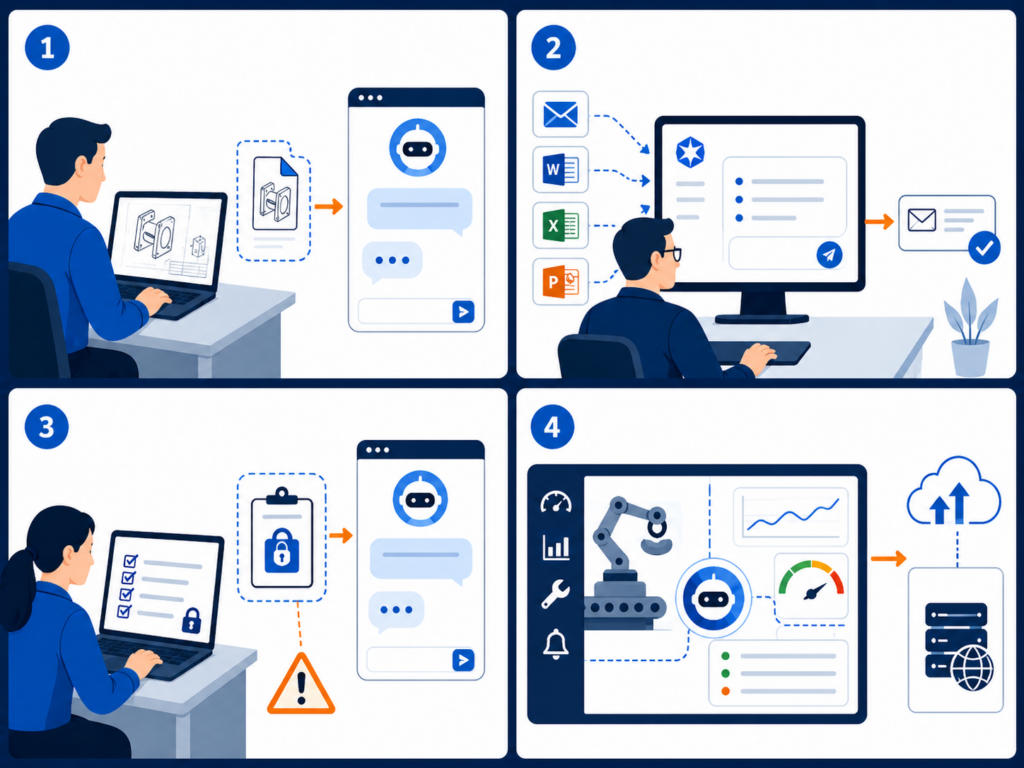
Four Risk Scenarios That Should Feel Familiar
The risk is easier to manage when it sounds like real work instead of abstract compliance language.
1. The engineer using public AI to speed up a drawing review
An engineer receives a customer print with tight tolerances and special handling notes. The job is urgent. Instead of manually summarizing the requirements, they paste sections into a public AI tool and ask for a checklist.
The output is useful. The exposure is the problem.
That prompt may include customer IP, controlled technical data, export-sensitive information, or contract-specific requirements. If the company later needs to prove that customer data stayed inside approved systems, there may be no clean audit trail.
2. The production manager using AI to clean up a customer update
A production manager wants to write a clearer explanation for a delayed shipment. They paste the customer’s email thread, internal notes, part numbers, job status, and quality issue into an AI tool and ask it to “make this sound professional.”
The issue here is not the polished response. It is everything that went into the prompt: customer identity, production timing, defect details, order status, and potentially sensitive commercial terms.
The X-Force Threat Intelligence Index 2026 reinforces why identity and data exposure matter. X-Force found credential harvesting and data leaks were leading impacts in 2025, and attackers continued to rely on stolen credentials, misconfigured access, and weak authentication to blend into normal business activity.
3. The CMMC supplier using AI to simplify CUI-heavy language
A defense supplier receives documentation from a prime contractor. An employee copies several paragraphs into an AI assistant and asks, “Can you explain this in plain English?”
That single prompt could create a CUI handling issue. The employee did not download malware. They did not click a phishing link. They simply used a convenient tool to understand a difficult document.
This is why an AI acceptable use policy manufacturer teams can actually follow is so important. Employees need clear rules for what is allowed, what is prohibited, and what to do when they are unsure.
4. The vendor AI feature no one vetted
A maintenance platform adds an AI troubleshooting feature. A technician enters machine symptoms, downtime history, error codes, and notes from prior service calls. The vendor’s AI model returns helpful recommendations.
But was that feature reviewed? Where is the data processed? Is it used for model training? Can the vendor’s subcontractors access it? Does it create a new system where production data is stored?
X-Force warned that AI adoption broadens the attack surface and that attackers are using generative AI to speed up social engineering, reconnaissance, and attack-path iteration. The same report also found manufacturing was the most-targeted industry for the fifth consecutive year, accounting for 27.7% of incidents in 2025.
Manufacturers already have enough exposure through vendors, remote access, cloud systems, and production networks. AI adds another layer unless it is governed.
Building the Policy: Six Elements of a Minimum Viable AI Governance Program
An AI governance policy does not need to start as a legal binder. For most small and mid-sized manufacturers, the better first move is a one-page policy your team can understand and use.
Here are the six sections that belong in a practical first version.
1. Approved tools
List which AI tools employees may use. Include Copilot, approved chatbots, AI features inside business applications, and any department-specific tools. If a tool is not on the list, employees should know how to request review.
2. Prohibited data
Be specific. Do not say “do not enter sensitive data.” Say what that means: CUI, customer drawings, engineering files, source code, pricing, contracts, employee records, financials, credentials, production data, regulated personal information, and nonpublic customer communications.
3. Allowed use cases
Give employees safe examples. Drafting a generic email from non-sensitive notes may be acceptable. Summarizing public information may be acceptable. Brainstorming a maintenance checklist without machine-specific or customer-specific data may be acceptable.
4. Review process for new AI tools
Define who reviews new tools before use. IT should look at security, data retention, authentication, logging, vendor terms, integrations, and whether the tool touches regulated data. For CMMC-regulated environments, the review should also consider whether the tool is inside the right cloud boundary.
5. Monitoring and nonconformity handling
The uploaded AI governance protocol recommends treating AI policy deviations as nonconformities: contain the issue, identify root cause, remediate the system weakness, and prevent recurrence. It also warns that blaming “human error” is usually the wrong answer; the deeper issue may be lack of training, lack of approved tools, or a stalled security review.
That is the right mindset. The goal is not to punish employees for using AI. The goal is to learn where policy, tools, and training are not keeping up.
6. Training and onboarding
Add AI rules to onboarding, annual security training, engineering team briefings, and manager checklists. Keep it plain. Employees should leave training knowing three things: what they can use, what they cannot paste, and whom to ask before using a new AI tool.
The protocol also recommends tracking AI issues through a lifecycle: identified, contained, root cause in progress, action planned, implementing, awaiting verification, and closed. That gives IT and leadership evidence that AI governance is being managed, not improvised.
The Point Is Not to Stop AI
Manufacturers should not treat AI like a problem to ban. The productivity benefits are real. AI can help teams summarize information, draft communications, analyze data, improve maintenance workflows, and reduce administrative drag.
The point is to build guardrails before the first serious exposure.
For manufacturers, AI governance is now part of security, compliance, cyber insurance readiness, and customer trust. If employees are already using AI, the business needs visibility. If Copilot is being considered, permissions and tenant architecture matter. If CUI is involved, AI use needs to be treated as a compliance boundary, not just a productivity choice.
Start small: inventory the tools, write the one-page policy, train employees, monitor for shadow AI, and create a simple process for exceptions and incidents.
If your IT budget has felt “tight” the last couple of years, 2026 is not shaping up to be a relief year. The macro indicators are pointing in one direction: technology spend is still expanding, licensing is getting more expensive, and the cost to deliver reliable, secure IT keeps climbing. For business owners and operations leaders, that typically translates into higher internal IT overhead and higher MSP service rates as providers have to absorb and pass through those upstream costs.
Below is what’s driving the trend—and how to plan (and protect your budget) before 2026 hits.
Global IT spending is still accelerating
Major analyst firms are forecasting continued growth in worldwide IT spend into 2026:
Gartner forecasts worldwide IT spending will reach $6.08 trillion in 2026, up 9.8% year-over-year.
IDC also projects IT spending growth of about 10% in 2026 (after a very strong 2025).
When overall IT spending grows at ~10%, it’s rarely because everything got cheaper. It’s typically a mix of:
higher consumption (more SaaS, more storage, more endpoints),
and higher unit costs in key categories.
That environment is exactly where MSP pricing pressure comes from.
Licensing increases are real
Even if your environment is stable, your vendors aren’t. One of the clearest, sourced examples going into 2026:
Microsoft announced commercial Microsoft 365 pricing updates effective July 1, 2026.
Reuters reported the change broadly, including increases across multiple business and enterprise plans.
For many Milwaukee-area SMBs, Microsoft 365 is a foundational platform (identity, email, collaboration, security features). When those per-user costs move, it pushes up:
your direct licensing line item, and/or
the managed overhead required to administer the platform properly (identity, conditional access, MFA, endpoint policies, backups, etc.).
Bottom line: even “steady-state” IT stacks get more expensive when major vendors reprice core suites.
Managed services demand keeps climbing
Demand growth matters because it affects labor markets, service scope, and pricing power.
Multiple market forecasts show managed services continuing to expand through 2026:
Research Nester estimates managed services market size around $424.14B in 2026.
MarketsandMarkets projects growth from $365.33B (2024) to $511.03B (2029) (a multi-year trendline that includes 2026).
As the market expands, MSPs are expected to deliver more than “helpdesk and patches.” Clients increasingly expect:
stronger security baselines,
faster response and deeper expertise,
tighter documentation and compliance readiness,
and more proactive monitoring and automation.
That shift changes cost structure—and pricing.
AI and data-center investment is raising the baseline cost of “modern IT”
Whether you’re “doing AI” or not, the ecosystem is investing heavily in the infrastructure that supports it. This drives cost pressure across cloud platforms, hosting, and the tools MSPs use.
For example, the Financial Times highlighted projections that hyperscalers could invest hundreds of billions in data infrastructure tied to AI, including substantial spending expected in 2026.
You don’t need to buy GPUs to feel the downstream impacts. These investment cycles often coincide with:
changing cloud pricing models,
increased demand for specialized skills,
and higher costs for the tooling MSPs rely on (monitoring, backup, security, automation).
What this means in plain English for SMB IT budgets in 2026
Most organizations feel cost increases in a few predictable places:
Per-user licensing and security add-ons rise (Microsoft and others).
Reactive environments cost more than standardized, proactively managed ones.
If your IT is currently “held together by heroics,” 2026 is when that model gets brutally expensive.
5 practical moves to reduce 2026 budget shock
1) Lock down your “minimum security baseline”
Standardize identity security, endpoint protections, patching, backups, and admin access policies. The more exceptions you have, the more expensive support becomes.
2) Reduce tool sprawl before renewal season
Every redundant product costs you twice: subscription + management overhead. Consolidation is one of the fastest ways to claw back budget.
3) Get ahead of licensing changes
If Microsoft 365 is core to your business, plan now for July 2026 adjustments—especially if you have seasonal hiring or frequent license churn.
4) Shift from “hourly surprises” to predictable agreements
If you’re still relying on reactive break/fix or loosely defined support, you’re exposed. Predictability is what protects budgets.
5) Treat 2026 as a contract strategy year
Many businesses wait until renewal to negotiate. That’s the worst time. The best time is before vendor pricing and MSP demand tighten further.
Lock in 2025 rates with CDS for a limited time
If you’re planning to make a change in 2026 (or you’re already expecting budget pressure), the smart move is to get ahead of it now.
Centurion Data Systems (CDS) is offering a limited-time option to lock in 2025 managed services rates for qualified Milwaukee-area businesses.
What you get:
A straightforward review of your current environment and renewal timelines
A practical scope recommendation (no fluff, no overbuying)
A 2026-readiness plan that prioritizes cost control and risk reduction
Contact CDS to request the “2025 Rate Lock” review before the offer window closes.