AI governance for manufacturing security is not a future planning topic anymore. It is already showing up in the daily habits of engineers, estimators, production managers, buyers, HR teams, and customer service staff.
The warning sign came early. In 2023, Samsung reportedly discovered that employees had entered sensitive company information into ChatGPT, including source code used to debug semiconductor systems and internal meeting content. Cyberhaven’s analysis later cited that incident as an example of what happens when helpful employees use public AI tools before policy catches up.
For a manufacturer, the equivalent is not hard to picture.
An engineer pastes a customer drawing into ChatGPT and asks it to summarize the tolerances. A project manager uploads contract language to generate a supplier checklist. A defense subcontractor copies Controlled Unclassified Information into an AI tool to rewrite a status update. A maintenance technician uses an AI browser extension to troubleshoot a recurring equipment fault and accidentally exposes production data.
Workers are not out to cause a breach, they are just trying to move faster.
That is the problem. AI is already in the workflow, but many IT policies still treat it like an optional tool instead of a new data path.
The AI Tools Already in Your Environment
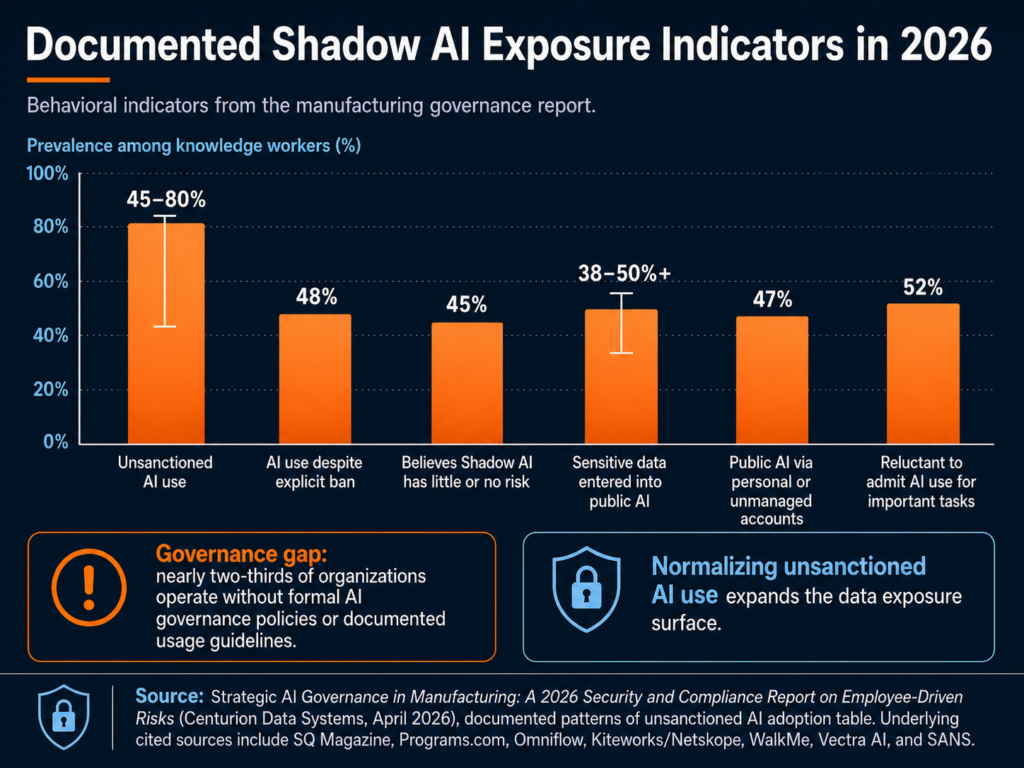
Most manufacturers do not have one AI problem. They have three.
1) Sanctioned AI (IT knows about it)
This is usually Microsoft Copilot (or “Copilot Chat”) because it’s bundled into daily work: Teams, Outlook, Word, Excel.
The good news: Microsoft positions Microsoft 365 Copilot as operating within the Microsoft 365 service boundary, and states prompts/responses and Microsoft Graph data aren’t used to train the underlying foundation models.
The catch: “inside the boundary” doesn’t automatically mean “safe for your business.” If you’ve got overshared SharePoint libraries, messy permissions, weak labeling, or no retention plan for Copilot interactions, Copilot can still surface things to people who shouldn’t see them (because they already had access somewhere).
Translation: Copilot can amplify whatever content hygiene you currently have—good or bad.
2) Unsanctioned AI (IT doesn’t know about it)
This is where things get spicy:
- ChatGPT / Claude / Gemini accounts created with personal emails
- “Just one quick question” to a public AI website
- AI browser extensions that read pages, emails, or clipboard content
- Consumer “meeting notes” tools used for Teams/Zoom recaps
And it’s not a rare edge case. Cyberhaven found that sensitive data made up 11% of what employees pasted into ChatGPT in their analysis.
In manufacturing terms, 11% isn’t “a few mistakes.” It’s a steady drip of drawings, supplier details, quotes, quality issues, and customer conversations—leaving your environment one paste at a time.
3) Embedded AI (it shows up inside other tools)
Even if you block public chatbots, AI can still be “baked into” tools you already run:
- ERP “AI insights” features
- Maintenance diagnostics that use AI to predict failures
- AI-assisted design features in engineering software
- Vendor portals that now include “smart assistants”
- Security tools using AI to summarize alerts
This category is easy to miss because it doesn’t look like “someone using AI.” It looks like a feature update.
The first step most teams skip: an AI usage audit
Before you write policy, you need visibility. A practical starter audit looks like:
- Review M365 usage: where Copilot is enabled, for whom, and which apps
- Look for “shadow AI” patterns in web proxy/DNS/firewall logs
- Inventory browser extensions (managed endpoints)
- Identify which SaaS/ERP/engineering tools have embedded AI features turned on
- Ask department leads one blunt question: “Which AI tools are people using to do their jobs faster?”
If you don’t know what’s in use, you can’t govern it.
For a manufacturing IT director, the lesson is direct: before you can govern AI, you need to know where it is. That means approved tools, unapproved tools, browser extensions, SaaS features, vendor portals, and operational platforms.
The Compliance Angle: CMMC, CUI, Copilot, and Insurance
AI governance becomes more serious when the manufacturer handles regulated data.
For defense suppliers, the issue is not just “Should employees use AI?” The sharper question is: Can we prove that CUI is not entering AI systems that are outside our authorized environment?
If you’re a manufacturer, compliance risk from AI usually shows up in one of four places: CUI handling, tenant boundaries, insurance renewal, and frameworks you can point to when leadership asks “what good looks like.”
CUI spillage risk for DoD suppliers (CMMC reality)
If you handle CUI, you’re already living inside a rule set that expects discipline around where that information is stored, processed, and transmitted.
- NIST SP 800-171 is the baseline “protect CUI in nonfederal systems” playbook many DoD contractors align to.
- DoD’s CMMC Level 2 assessment guidance ties certification to regulatory requirements and assessments for those environments.
So here’s the practical problem with generative AI:
If an employee pastes CUI into an unsanctioned AI tool or uploads a controlled drawing into a consumer “AI helper”, you’ve got CUI leaving the controlled environment. Whether that becomes a reportable incident depends on your contracts and incident response requirements, but it’s never a good day.
This is why “CMMC AI tools” is becoming a real discussion internally: not because AI is banned, but because CUI boundaries are non-negotiable.
Microsoft Copilot: commercial vs. GCC / GCC High / DoD
A lot of manufacturers are in a mixed reality:
- Corporate runs a commercial Microsoft 365 tenant
- Defense work requires tighter controls, sometimes government cloud alignment
That does not mean Copilot is automatically unsafe. It means Microsoft Copilot manufacturing security depends on tenant type, data type, configuration, permissions, labels, logging, and user behavior.
Microsoft’s guidance on government cloud environments explicitly calls out that GCC High is intended for organizations handling CUI and that Copilot in government clouds operates within the government tenant, with prompts/responses remaining in that environment.
Also important: Microsoft states Microsoft 365 Copilot prompts/responses aren’t used to train foundation models and that Copilot only surfaces data users have permission to access.
But here’s the compliance gotcha:
Even if Copilot is “secure,” your environment choice still matters. If your contract requires CUI to live in a specific enclave (and your security plan is built around that), you don’t want CUI “handled casually” in the wrong tenant just because it’s convenient.
A framework you can actually cite: NIST AI RMF
When leadership asks, “What are we aligning to?”, the NIST AI Risk Management Framework (AI RMF 1.0) gives you a credible backbone with four core functions: Govern, Map, Measure, Manage.
You don’t have to implement a big enterprise program on day one. But referencing NIST AI RMF helps you:
- justify why governance is necessary,
- prioritize what to tackle first,
- and document decisions in a way auditors and insurers understand.
Cyber insurance: AI is starting to show up at renewal
Cyber insurance is shifting from “do you have MFA?” to “prove you can manage modern risk.” HUB International notes that cyber insurers will ask how an insured uses AI, what types of data AI tools are trained on or regularly handle, whether the company complies with AI laws and regulations, and what first- and third-party liabilities may apply.
We’re seeing more discussion of AI exclusions and “AI-connected” claim language in policies and renewals.
What does that mean for an IT Director at a manufacturer?
At renewal, don’t be surprised by questions like:
- Do employees use generative AI tools for business work? Which ones?
- Do you have an AI acceptable use policy your workforce is trained on?
- Can you show controls for data loss prevention (DLP) and logging around AI use?
- Do you review third-party AI features in SaaS tools (vendor risk)?
For many manufacturers, the honest answer is still “not yet.”
NIST gives teams a useful starting point. The NIST AI Risk Management Framework is designed to help organizations that design, develop, deploy, or use AI systems manage AI risk and support trustworthy AI use. For a small IT team, that does not have to become a 200-page governance project. It can start with inventory, classification, acceptable use, monitoring, training, and incident response.
Four Risk Scenarios That Should Feel Familiar
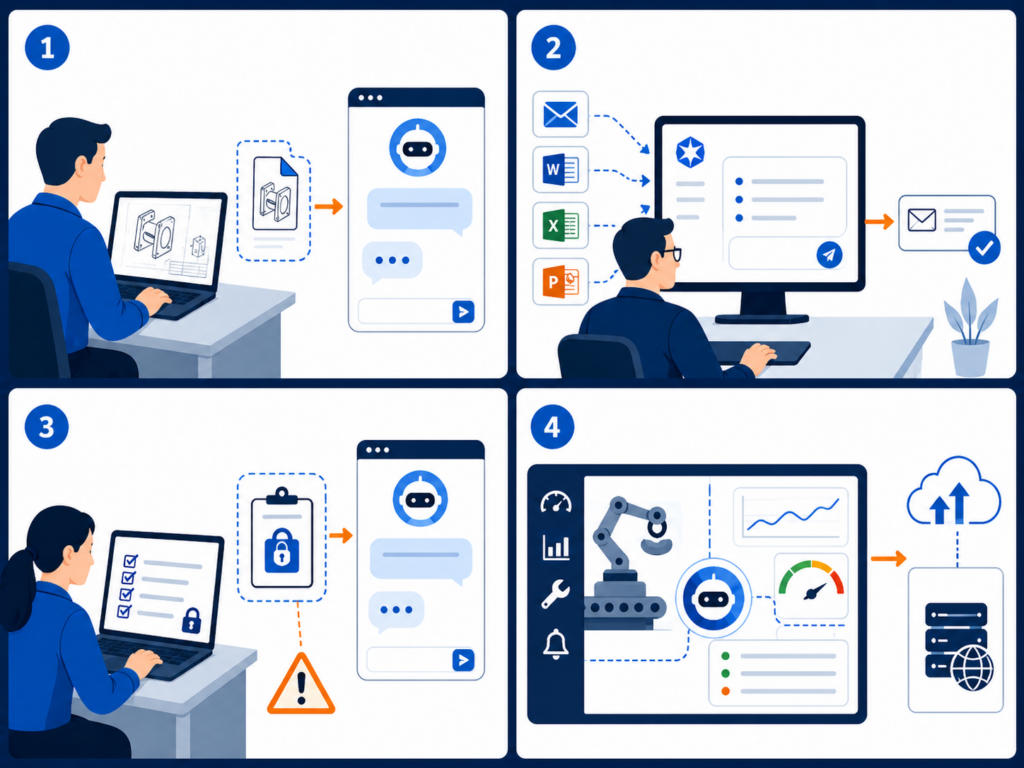
The risk is easier to manage when it sounds like real work instead of abstract compliance language.
1. The engineer using public AI to speed up a drawing review
An engineer receives a customer print with tight tolerances and special handling notes. The job is urgent. Instead of manually summarizing the requirements, they paste sections into a public AI tool and ask for a checklist.
The output is useful. The exposure is the problem.
That prompt may include customer IP, controlled technical data, export-sensitive information, or contract-specific requirements. If the company later needs to prove that customer data stayed inside approved systems, there may be no clean audit trail.
2. The production manager using AI to clean up a customer update
A production manager wants to write a clearer explanation for a delayed shipment. They paste the customer’s email thread, internal notes, part numbers, job status, and quality issue into an AI tool and ask it to “make this sound professional.”
The issue here is not the polished response. It is everything that went into the prompt: customer identity, production timing, defect details, order status, and potentially sensitive commercial terms.
The X-Force Threat Intelligence Index 2026 reinforces why identity and data exposure matter. X-Force found credential harvesting and data leaks were leading impacts in 2025, and attackers continued to rely on stolen credentials, misconfigured access, and weak authentication to blend into normal business activity.
3. The CMMC supplier using AI to simplify CUI-heavy language
A defense supplier receives documentation from a prime contractor. An employee copies several paragraphs into an AI assistant and asks, “Can you explain this in plain English?”
That single prompt could create a CUI handling issue. The employee did not download malware. They did not click a phishing link. They simply used a convenient tool to understand a difficult document.
This is why an AI acceptable use policy manufacturer teams can actually follow is so important. Employees need clear rules for what is allowed, what is prohibited, and what to do when they are unsure.
4. The vendor AI feature no one vetted
A maintenance platform adds an AI troubleshooting feature. A technician enters machine symptoms, downtime history, error codes, and notes from prior service calls. The vendor’s AI model returns helpful recommendations.
But was that feature reviewed? Where is the data processed? Is it used for model training? Can the vendor’s subcontractors access it? Does it create a new system where production data is stored?
X-Force warned that AI adoption broadens the attack surface and that attackers are using generative AI to speed up social engineering, reconnaissance, and attack-path iteration. The same report also found manufacturing was the most-targeted industry for the fifth consecutive year, accounting for 27.7% of incidents in 2025.
Manufacturers already have enough exposure through vendors, remote access, cloud systems, and production networks. AI adds another layer unless it is governed.
Building the Policy: Six Elements of a Minimum Viable AI Governance Program
An AI governance policy does not need to start as a legal binder. For most small and mid-sized manufacturers, the better first move is a one-page policy your team can understand and use.
Here are the six sections that belong in a practical first version.
1. Approved tools
List which AI tools employees may use. Include Copilot, approved chatbots, AI features inside business applications, and any department-specific tools. If a tool is not on the list, employees should know how to request review.
2. Prohibited data
Be specific. Do not say “do not enter sensitive data.” Say what that means: CUI, customer drawings, engineering files, source code, pricing, contracts, employee records, financials, credentials, production data, regulated personal information, and nonpublic customer communications.
3. Allowed use cases
Give employees safe examples. Drafting a generic email from non-sensitive notes may be acceptable. Summarizing public information may be acceptable. Brainstorming a maintenance checklist without machine-specific or customer-specific data may be acceptable.
4. Review process for new AI tools
Define who reviews new tools before use. IT should look at security, data retention, authentication, logging, vendor terms, integrations, and whether the tool touches regulated data. For CMMC-regulated environments, the review should also consider whether the tool is inside the right cloud boundary.
5. Monitoring and nonconformity handling
The uploaded AI governance protocol recommends treating AI policy deviations as nonconformities: contain the issue, identify root cause, remediate the system weakness, and prevent recurrence. It also warns that blaming “human error” is usually the wrong answer; the deeper issue may be lack of training, lack of approved tools, or a stalled security review.
That is the right mindset. The goal is not to punish employees for using AI. The goal is to learn where policy, tools, and training are not keeping up.
6. Training and onboarding
Add AI rules to onboarding, annual security training, engineering team briefings, and manager checklists. Keep it plain. Employees should leave training knowing three things: what they can use, what they cannot paste, and whom to ask before using a new AI tool.
The protocol also recommends tracking AI issues through a lifecycle: identified, contained, root cause in progress, action planned, implementing, awaiting verification, and closed. That gives IT and leadership evidence that AI governance is being managed, not improvised.
The Point Is Not to Stop AI
Manufacturers should not treat AI like a problem to ban. The productivity benefits are real. AI can help teams summarize information, draft communications, analyze data, improve maintenance workflows, and reduce administrative drag.
The point is to build guardrails before the first serious exposure.
For manufacturers, AI governance is now part of security, compliance, cyber insurance readiness, and customer trust. If employees are already using AI, the business needs visibility. If Copilot is being considered, permissions and tenant architecture matter. If CUI is involved, AI use needs to be treated as a compliance boundary, not just a productivity choice.
Start small: inventory the tools, write the one-page policy, train employees, monitor for shadow AI, and create a simple process for exceptions and incidents.