The cybersecurity threats Wisconsin manufacturers face are no longer limited to stolen files or suspicious emails. When ransomware hits a production environment, it can escalate fast: CNC machines stop receiving job files, shipping slows down, ERP data becomes unavailable, supervisors lose visibility into work orders, and the plant floor starts making decisions with incomplete information.
That is why manufacturing has become such an attractive target. Attackers know many manufacturers run lean IT teams, older production systems, remote vendor connections, and tight delivery schedules. A bank can freeze transactions. A manufacturer may have to stop a line.
National threat data now backs up what many Wisconsin IT directors already feel: manufacturing is under heavier pressure than most industries. IBM reported thatmanufacturing was the most attacked industry for the fourth consecutive year in 2024, with the highest number of ransomware cases among industries it tracked.
The Numbers: What the Threat Data Means for Wisconsin Manufacturers
The clearest takeaway from the 2023–2025 data is this: ransomware is now an operations problem, not just an IT problem.
Dragos documented 1,693 ransomware attacks against industrial organizations in 2024, an 87% increase over the prior year, and found that 75% of ransomware incidents it responded to caused a partial OT shutdown while 25% caused a full OT shutdown.
For a Wisconsin manufacturer, that can mean delayed shipments, overtime recovery, missed contract obligations, and customer confidence problems.
Verizon’s 2025 manufacturing breach data also shows why mid-sized manufacturers are exposed. In manufacturing breaches, ransomware appeared in 47% of cases, stolen credentials in 34%, exploited vulnerabilities in 23%, and phishing in 19%. Verizon also found that more than 90% of breached manufacturing organizations in its sample were SMBs with fewer than 1,000 employees.
That matters because many Wisconsin manufacturers operate exactly in that range: large enough to be valuable, but not large enough to run a 24/7 security operations center. Zscaler’s 2025 ransomware research found manufacturing was the most frequently hit sector in its data, with 1,063 attacks over the prior year, while U.S. victims accounted for 50% of ransomware attacks globally.
Locally, the 2023 ransomware attack involving Fincantieri Marinette Marine showed what that risk looks like on the shop floor. USNI News reported that the attack affected servers used to feed instructions to CNC manufacturing machines and knocked some systems offline for several days.
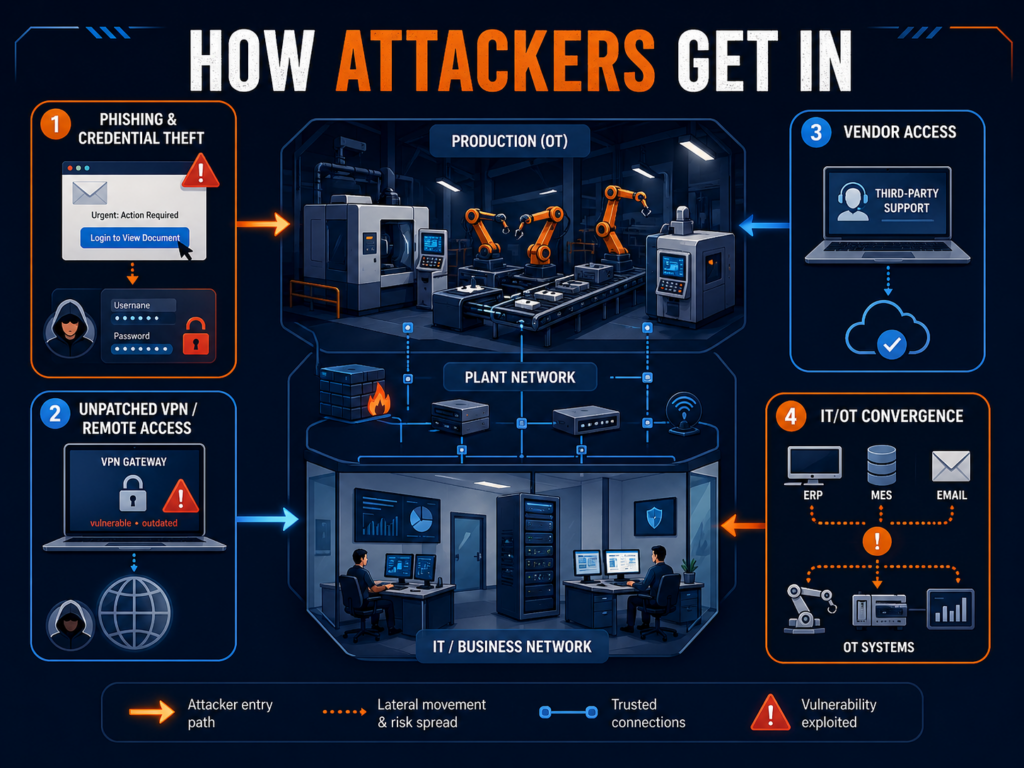
How Attackers Get In
Most manufacturing ransomware attacks do not start with movie-style hacking. They start with access that should have been harder to use, easier to monitor, or closed months ago.
1. Phishing and Credential Theft
A phishing email in a manufacturing business rarely looks like a generic scam. It may look like a supplier invoice, a freight update, a customer drawing, a quote request, or a Microsoft 365 login prompt sent to a plant manager rushing between meetings.
Once attackers capture a password, they try to log in like a real employee. IBM reported that stolen credentials surged 71% year over year and represented 30% of incidents it responded to in 2023, tied with phishing as the top infection vector.
In a plant environment, that one login can lead to email access, file shares, ERP systems, CAD files, or maintenance documentation. If multi-factor authentication is missing from VPN, admin accounts, or email, the attacker’s job gets much easier.
2. Unpatched VPN and Remote Access
Manufacturers rely on remote access for good reasons. Engineers connect after hours. Vendors support equipment. IT teams troubleshoot without driving to the plant. The problem is that VPNs, firewalls, and remote access portals are some of the first doors attackers check.
Verizon’s 2025 SMB snapshot noted that exploitation of vulnerabilities has become the most common initial access vector in ransomware breaches, driven heavily by attacks on perimeter devices.
For manufacturers, the risk is not just “someone got into the network.” The risk is that an old VPN account, unpatched firewall, or shared vendor login gives an attacker a path toward the systems production depends on.
3. Vendor Access
Manufacturing runs on outside access: machine vendors, ERP consultants, managed software providers, maintenance contractors, logistics platforms, and sometimes customers with portal access. Each relationship may be necessary. Each one also creates a door.
The issue is usually not that vendors are careless. It is that access is often granted once and reviewed rarely. A vendor account may stay active after a project ends. A shared login may exist because “that’s how the machine vendor set it up.” A remote support tool may be installed on a workstation nobody has inventoried.
When attackers find those paths, they do not need to break down the front door. They walk in through a service entrance.
4. IT/OT Convergence
The phrase OT IT security manufacturing sounds technical, but the business issue is simple: the office network and production network are now more connected than they used to be.
ERP talks to scheduling. Scheduling talks to production. Engineers push files to machines. Supervisors pull reports from plant-floor systems. Remote monitoring tools collect equipment data.
That connectivity helps manufacturers move faster, but it also gives attackers more ways to turn an IT incident into an operations event. The Fincantieri Marinette Marine incident is a practical example: the impact was not limited to email or back-office disruption; it touched networked operations tied to CNC workflows.
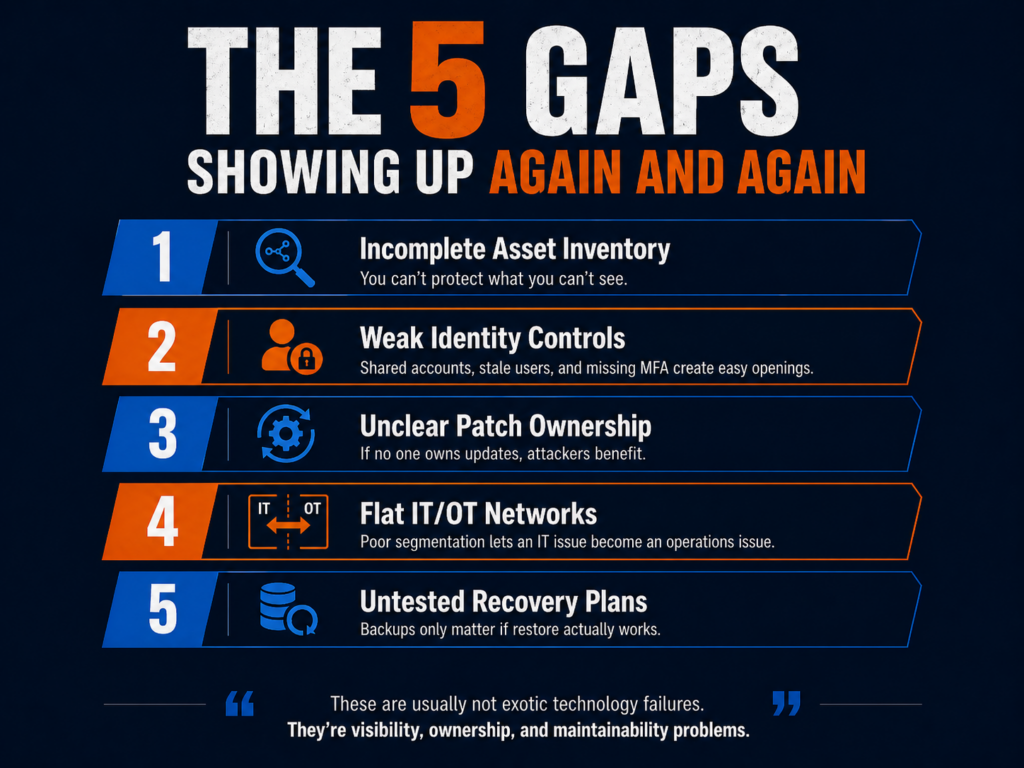
The 5 Gaps Showing Up Again and Again
The pattern in the data is not that manufacturers are being beaten by exotic attacks. The pattern is that attackers keep finding the same gaps: access, patching, documentation, segmentation, and recovery.
“The future of the Industrial Heartland depends on its ability to defend the digital code that now governs its physical machines.”
Here are the five gaps Wisconsin manufacturers should pay attention to first.
1. Incomplete asset inventory.
You cannot protect what you cannot see. Many manufacturers know their servers and laptops, but not every vendor tool, engineering workstation, old switch, remote access appliance, or production-connected PC.
2. Weak identity controls.
Shared accounts, stale users, missing MFA, and standing admin rights give attackers room to move. This is especially risky for executives, IT admins, engineers, and vendor accounts.
3. Unclear patch ownership.
IT may patch Windows systems, but who owns firmware, firewalls, VPNs, HMIs, PLC support stations, and vendor-managed equipment? When nobody owns the patching calendar, attackers benefit.
4. Flat networks between IT and OT.
If ransomware can spread from a compromised office workstation into production-adjacent systems, the business has a segmentation problem. Segmentation is not about making the plant harder to use. It is about making a bad day smaller.
5. Untested recovery plans.
Backups are helpful only if they restore quickly and completely. Cyber insurers and customers increasingly expect evidence: restore tests, logs, incident response plans, and documented roles. Current cyber insurance renewal guidance, for example, focuses on MFA, EDR, backup restore testing, and evidence gathering as practical readiness steps.
For defense suppliers, this also connects to compliance. The Department of Defense CMMC program rule became effective December 16, 2024, and phased CMMC implementation began November 10, 2025. For aCMMC Wisconsin manufacturer, cybersecurity documentation is no longer just a best practice. It can affect contract eligibility.
What IT Directors Are Doing About It
Many Wisconsin manufacturers do not need to replace their IT teams. They need to stop asking a small internal team to do every job at once.
That is where the co-managed IT model is gaining traction. Internal IT keeps ownership of the business: users, systems, plant priorities, ERP projects, production needs, and leadership communication. A co-managed cybersecurity partner adds the pieces that are hard to staff internally, such as continuous monitoring, patch compliance tracking, endpoint detection, log review, incident response planning, backup validation, and security documentation.
This model works well for manufacturers because it respects how plants operate. Production cannot wait for a generic enterprise security program. IT needs help that fits maintenance windows, vendor realities, older systems, and uptime requirements.
The best co-managed relationships also produce evidence. That matters for cyber insurance, customer audits, CMMC readiness, and executive reporting. Your co-managed IT partner can provide you with help and documentation around MFA, role-based access, incident response plans, backup testing, vendor controls, and any other cybersecurity policy controls are needed. Here you can find anUltimate Compliance Checklist we put together for Milwaukee businesses.
The Warning Is Clear, but So Is the Path Forward
The 2023–2025 threat data tells a clear story: manufacturers are high-value ransomware targets because downtime hurts immediately. For Wisconsin manufacturers, this is not a distant national trend. The local and sector-level evidence shows attackers are already focused on production-heavy environments, remote access, stolen credentials, vendors, and IT/OT weak spots.
The good news is that the biggest improvements are practical. Start with visibility. Lock down identity. Patch the systems attackers actually use to get in. Segment production from office IT where it matters. Test recovery before a crisis. Document the work so leadership, insurers, auditors, and customers can see progress.
AI governance for manufacturing security is not a future planning topic anymore. It is already showing up in the daily habits of engineers, estimators, production managers, buyers, HR teams, and customer service staff.
The warning sign came early. In 2023, Samsung reportedly discovered that employees had entered sensitive company information into ChatGPT, including source code used to debug semiconductor systems and internal meeting content. Cyberhaven’s analysis later cited that incident as an example of what happens when helpful employees use public AI tools before policy catches up.
For a manufacturer, the equivalent is not hard to picture.
An engineer pastes a customer drawing into ChatGPT and asks it to summarize the tolerances. A project manager uploads contract language to generate a supplier checklist. A defense subcontractor copies Controlled Unclassified Information into an AI tool to rewrite a status update. A maintenance technician uses an AI browser extension to troubleshoot a recurring equipment fault and accidentally exposes production data.
Workers are not out to cause a breach, they are just trying to move faster.
That is the problem. AI is already in the workflow, but many IT policies still treat it like an optional tool instead of a new data path.
The AI Tools Already in Your Environment
Most manufacturers do not have one AI problem. They have three.
1) Sanctioned AI (IT knows about it)
This is usually Microsoft Copilot (or “Copilot Chat”) because it’s bundled into daily work: Teams, Outlook, Word, Excel.
The good news: Microsoft positions Microsoft 365 Copilot as operating within the Microsoft 365 service boundary, and states prompts/responses and Microsoft Graph data aren’t used to train the underlying foundation models.
The catch: “inside the boundary” doesn’t automatically mean “safe for your business.” If you’ve got overshared SharePoint libraries, messy permissions, weak labeling, or no retention plan for Copilot interactions, Copilot can still surface things to people who shouldn’t see them (because they already had access somewhere).
Translation: Copilot can amplify whatever content hygiene you currently have—good or bad.
2) Unsanctioned AI (IT doesn’t know about it)
This is where things get spicy:
ChatGPT / Claude / Gemini accounts created with personal emails
“Just one quick question” to a public AI website
AI browser extensions that read pages, emails, or clipboard content
Consumer “meeting notes” tools used for Teams/Zoom recaps
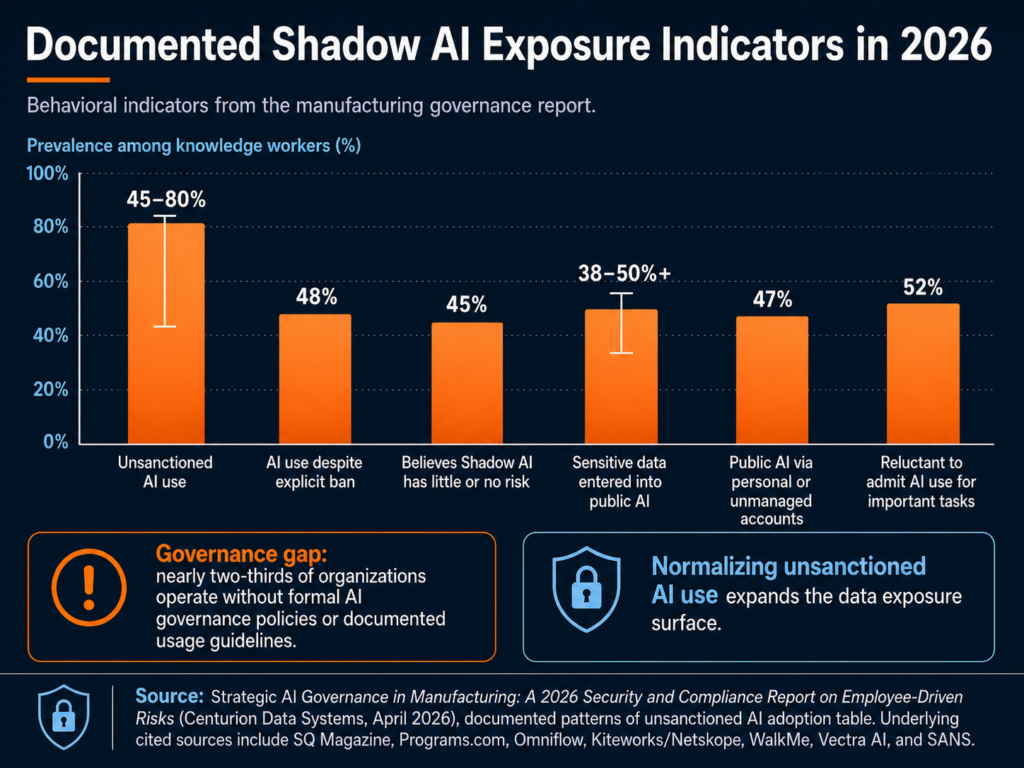
In manufacturing terms, 11% isn’t “a few mistakes.” It’s a steady drip of drawings, supplier details, quotes, quality issues, and customer conversations—leaving your environment one paste at a time.
3) Embedded AI (it shows up inside other tools)
Even if you block public chatbots, AI can still be “baked into” tools you already run:
ERP “AI insights” features
Maintenance diagnostics that use AI to predict failures
AI-assisted design features in engineering software
Vendor portals that now include “smart assistants”
Security tools using AI to summarize alerts
This category is easy to miss because it doesn’t look like “someone using AI.” It looks like a feature update.
The first step most teams skip: an AI usage audit
Before you write policy, you need visibility. A practical starter audit looks like:
Review M365 usage: where Copilot is enabled, for whom, and which apps
Look for “shadow AI” patterns in web proxy/DNS/firewall logs
Inventory browser extensions (managed endpoints)
Identify which SaaS/ERP/engineering tools have embedded AI features turned on
Ask department leads one blunt question: “Which AI tools are people using to do their jobs faster?”
If you don’t know what’s in use, you can’t govern it.
For a manufacturing IT director, the lesson is direct: before you can govern AI, you need to know where it is. That means approved tools, unapproved tools, browser extensions, SaaS features, vendor portals, and operational platforms.
The Compliance Angle: CMMC, CUI, Copilot, and Insurance
AI governance becomes more serious when the manufacturer handles regulated data.
For defense suppliers, the issue is not just “Should employees use AI?” The sharper question is: Can we prove that CUI is not entering AI systems that are outside our authorized environment?
If you’re a manufacturer, compliance risk from AI usually shows up in one of four places: CUI handling, tenant boundaries, insurance renewal, and frameworks you can point to when leadership asks “what good looks like.”
CUI spillage risk for DoD suppliers (CMMC reality)
If you handle CUI, you’re already living inside a rule set that expects discipline around where that information is stored, processed, and transmitted.
NIST SP 800-171 is the baseline “protect CUI in nonfederal systems” playbook many DoD contractors align to.
DoD’s CMMC Level 2 assessment guidance ties certification to regulatory requirements and assessments for those environments.
So here’s the practical problem with generative AI:
If an employee pastes CUI into an unsanctioned AI tool or uploads a controlled drawing into a consumer “AI helper”, you’ve got CUI leaving the controlled environment. Whether that becomes a reportable incident depends on your contracts and incident response requirements, but it’s never a good day.
This is why “CMMC AI tools” is becoming a real discussion internally: not because AI is banned, but because CUI boundaries are non-negotiable.
Microsoft Copilot: commercial vs. GCC / GCC High / DoD
A lot of manufacturers are in a mixed reality:
Corporate runs a commercial Microsoft 365 tenant
Defense work requires tighter controls, sometimes government cloud alignment
That does not mean Copilot is automatically unsafe. It means Microsoft Copilot manufacturing security depends on tenant type, data type, configuration, permissions, labels, logging, and user behavior.
Microsoft’s guidance on government cloud environments explicitly calls out that GCC High is intended for organizations handling CUI and that Copilot in government clouds operates within the government tenant, with prompts/responses remaining in that environment.
Also important: Microsoft states Microsoft 365 Copilot prompts/responses aren’t used to train foundation models and that Copilot only surfaces data users have permission to access.
But here’s the compliance gotcha: Even if Copilot is “secure,” your environment choice still matters. If your contract requires CUI to live in a specific enclave (and your security plan is built around that), you don’t want CUI “handled casually” in the wrong tenant just because it’s convenient.
A framework you can actually cite: NIST AI RMF
When leadership asks, “What are we aligning to?”, the NIST AI Risk Management Framework (AI RMF 1.0) gives you a credible backbone with four core functions: Govern, Map, Measure, Manage.
You don’t have to implement a big enterprise program on day one. But referencing NIST AI RMF helps you:
justify why governance is necessary,
prioritize what to tackle first,
and document decisions in a way auditors and insurers understand.
Cyber insurance: AI is starting to show up at renewal
Cyber insurance is shifting from “do you have MFA?” to “prove you can manage modern risk.” HUB International notes that cyber insurers will ask how an insured uses AI, what types of data AI tools are trained on or regularly handle, whether the company complies with AI laws and regulations, and what first- and third-party liabilities may apply.
We’re seeing more discussion of AI exclusions and “AI-connected” claim language in policies and renewals.
What does that mean for an IT Director at a manufacturer?
At renewal, don’t be surprised by questions like:
Do employees use generative AI tools for business work? Which ones?
Do you have an AI acceptable use policy your workforce is trained on?
Can you show controls for data loss prevention (DLP) and logging around AI use?
Do you review third-party AI features in SaaS tools (vendor risk)?
For many manufacturers, the honest answer is still “not yet.”
NIST gives teams a useful starting point. The NIST AI Risk Management Framework is designed to help organizations that design, develop, deploy, or use AI systems manage AI risk and support trustworthy AI use. For a small IT team, that does not have to become a 200-page governance project. It can start with inventory, classification, acceptable use, monitoring, training, and incident response.
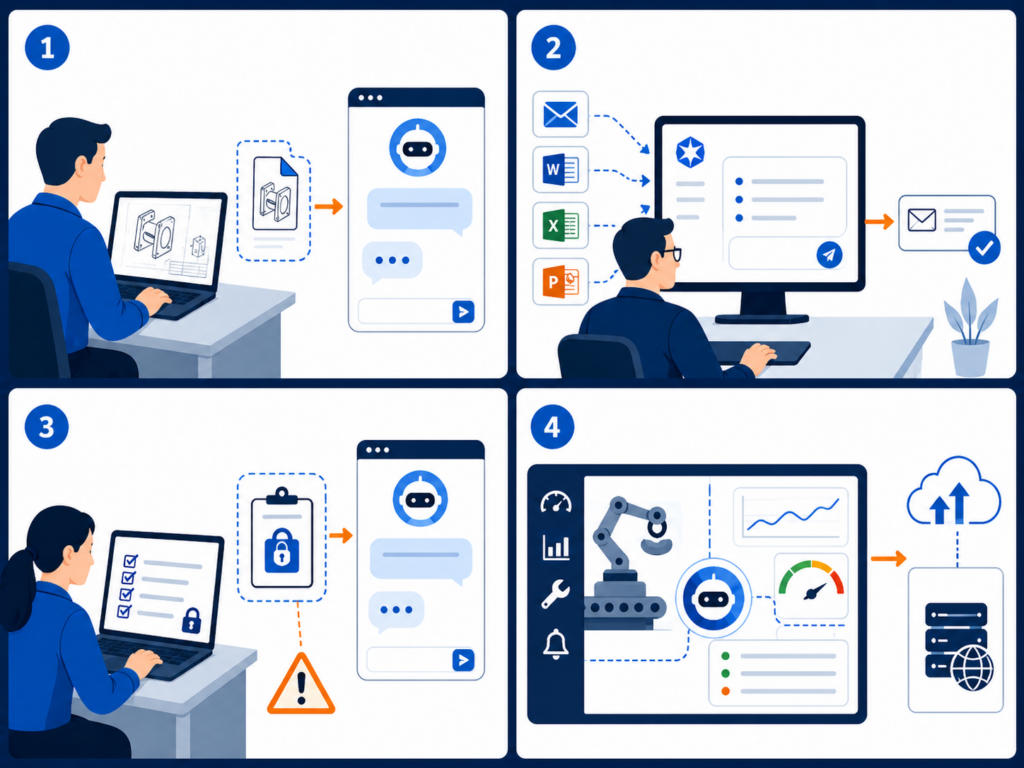
Four Risk Scenarios That Should Feel Familiar
The risk is easier to manage when it sounds like real work instead of abstract compliance language.
1. The engineer using public AI to speed up a drawing review
An engineer receives a customer print with tight tolerances and special handling notes. The job is urgent. Instead of manually summarizing the requirements, they paste sections into a public AI tool and ask for a checklist.
The output is useful. The exposure is the problem.
That prompt may include customer IP, controlled technical data, export-sensitive information, or contract-specific requirements. If the company later needs to prove that customer data stayed inside approved systems, there may be no clean audit trail.
2. The production manager using AI to clean up a customer update
A production manager wants to write a clearer explanation for a delayed shipment. They paste the customer’s email thread, internal notes, part numbers, job status, and quality issue into an AI tool and ask it to “make this sound professional.”
The issue here is not the polished response. It is everything that went into the prompt: customer identity, production timing, defect details, order status, and potentially sensitive commercial terms.
The X-Force Threat Intelligence Index 2026 reinforces why identity and data exposure matter. X-Force found credential harvesting and data leaks were leading impacts in 2025, and attackers continued to rely on stolen credentials, misconfigured access, and weak authentication to blend into normal business activity.
3. The CMMC supplier using AI to simplify CUI-heavy language
A defense supplier receives documentation from a prime contractor. An employee copies several paragraphs into an AI assistant and asks, “Can you explain this in plain English?”
That single prompt could create a CUI handling issue. The employee did not download malware. They did not click a phishing link. They simply used a convenient tool to understand a difficult document.
This is why an AI acceptable use policy manufacturer teams can actually follow is so important. Employees need clear rules for what is allowed, what is prohibited, and what to do when they are unsure.
4. The vendor AI feature no one vetted
A maintenance platform adds an AI troubleshooting feature. A technician enters machine symptoms, downtime history, error codes, and notes from prior service calls. The vendor’s AI model returns helpful recommendations.
But was that feature reviewed? Where is the data processed? Is it used for model training? Can the vendor’s subcontractors access it? Does it create a new system where production data is stored?
X-Force warned that AI adoption broadens the attack surface and that attackers are using generative AI to speed up social engineering, reconnaissance, and attack-path iteration. The same report also found manufacturing was the most-targeted industry for the fifth consecutive year, accounting for 27.7% of incidents in 2025.
Manufacturers already have enough exposure through vendors, remote access, cloud systems, and production networks. AI adds another layer unless it is governed.
Building the Policy: Six Elements of a Minimum Viable AI Governance Program
An AI governance policy does not need to start as a legal binder. For most small and mid-sized manufacturers, the better first move is a one-page policy your team can understand and use.
Here are the six sections that belong in a practical first version.
1. Approved tools
List which AI tools employees may use. Include Copilot, approved chatbots, AI features inside business applications, and any department-specific tools. If a tool is not on the list, employees should know how to request review.
2. Prohibited data
Be specific. Do not say “do not enter sensitive data.” Say what that means: CUI, customer drawings, engineering files, source code, pricing, contracts, employee records, financials, credentials, production data, regulated personal information, and nonpublic customer communications.
3. Allowed use cases
Give employees safe examples. Drafting a generic email from non-sensitive notes may be acceptable. Summarizing public information may be acceptable. Brainstorming a maintenance checklist without machine-specific or customer-specific data may be acceptable.
4. Review process for new AI tools
Define who reviews new tools before use. IT should look at security, data retention, authentication, logging, vendor terms, integrations, and whether the tool touches regulated data. For CMMC-regulated environments, the review should also consider whether the tool is inside the right cloud boundary.
5. Monitoring and nonconformity handling
The uploaded AI governance protocol recommends treating AI policy deviations as nonconformities: contain the issue, identify root cause, remediate the system weakness, and prevent recurrence. It also warns that blaming “human error” is usually the wrong answer; the deeper issue may be lack of training, lack of approved tools, or a stalled security review.
That is the right mindset. The goal is not to punish employees for using AI. The goal is to learn where policy, tools, and training are not keeping up.
6. Training and onboarding
Add AI rules to onboarding, annual security training, engineering team briefings, and manager checklists. Keep it plain. Employees should leave training knowing three things: what they can use, what they cannot paste, and whom to ask before using a new AI tool.
The protocol also recommends tracking AI issues through a lifecycle: identified, contained, root cause in progress, action planned, implementing, awaiting verification, and closed. That gives IT and leadership evidence that AI governance is being managed, not improvised.
The Point Is Not to Stop AI
Manufacturers should not treat AI like a problem to ban. The productivity benefits are real. AI can help teams summarize information, draft communications, analyze data, improve maintenance workflows, and reduce administrative drag.
The point is to build guardrails before the first serious exposure.
For manufacturers, AI governance is now part of security, compliance, cyber insurance readiness, and customer trust. If employees are already using AI, the business needs visibility. If Copilot is being considered, permissions and tenant architecture matter. If CUI is involved, AI use needs to be treated as a compliance boundary, not just a productivity choice.
Start small: inventory the tools, write the one-page policy, train employees, monitor for shadow AI, and create a simple process for exceptions and incidents.
Compliance affects so many aspects of a business: insurance eligibility, client retention, contracts, partnerships, and even whether you are allowed to bid on certain manufacturing or government projects. Whether you manage patient records, financial data, employee information, or vendor credentials, data protection requirements apply to your business in some form.
This guide gives you a clear view of the compliance landscape, the regulations that matter most in Wisconsin, what your business needs to do to stay compliant, and how to turn compliance from a risk into an advantage.
1. Why Compliance Matters
Compliance is not just about avoiding penalties. It is about protecting your business, safeguarding your relationships, and building trust with the clients you serve.
Here is why it matters:
Reason
What It Means in Real Life
Cyber insurance
Most policies now require MFA, backups, encryption, and recovery plans before coverage
Contract eligibility
Manufacturers, healthcare networks, and financial services often require proof of controls
Client retention
Clients increasingly ask for security questionnaires, SOC reports, or compliance attestations
Risk reduction
Strong compliance practices help prevent both cyberattacks and operational failures
Regulatory protection
HIPAA, FTC, GDPR or CMMC violations can result in heavy fines and legal action
Compliance is no longer optional for companies with sensitive data, vendor access, or regulated clients. The question is whether your systems and documentation are audit-ready.
2. Key Regulations That Milwaukee Businesses Should Understand
Not every business is governed by the same frameworks, but most fall under at least one of these:
Regulation
Who It Applies To
What It Covers
HIPAA
Medical, dental, billing, labs, insurance, managed service providers handling PHI
Protected Health Information, data handling, breach response, access control
CMMC
Manufacturers, contractors, engineering firms that work with the U.S. Department of Defense
Controlled Unclassified Information (CUI), cybersecurity maturity, documentation
GDPR
Any U.S. business holding personal data of EU citizens or processing EU transactions
Privacy rights, consent, data storage, exporting, reporting
Documented Business Associate Agreements (BAA) if applicable
Third-party access controls for maintenance providers
Incident Response & Reporting Readiness
Defined response team and communication protocol
SEC, HIPAA, DoD, FTC, or Wisconsin state breach reporting requirements
Logging and audit trails for systems and user access
You do not need to implement everything at once. But you do need a roadmap that lines up with your risk level, industry requirements, and insurance expectations.
4. Consequences of Non-Compliance
It is not just about fines. The bigger issues are financial disruption, legal exposure, and loss of reputation.
Risk
Real-World Impact
Cyber insurance claim denial
Business pays out-of-pocket for recovery, legal, and ransom costs
Lost contracts or bids
Disqualified from DoD, manufacturing, healthcare, or financial industry work
Lawsuits or regulatory penalties
HIPAA, FTC, or GDPR fines ranging from thousands to millions
Downtime and operational disruption
Lost productivity, supply chain delays, billing delays, missed deadlines
Client or partner distrust
Loss of accounts due to perceived negligence
Businesses that cannot demonstrate compliance often struggle to compete, even if they have strong operations.
5. How Centurion Helps with Compliance
We focus on practical, real-world compliance designed for Wisconsin SMBs, not enterprise-sized frameworks that do not apply.
Here is how we help:
Need
How Centurion Supports
Assessment
Compliance readiness audit with written risk report
Documentation
We help create policies, runbooks, and access logs
Tools
Backup, encryption, EDR, MFA, reporting, and vendor review
Implementation
We deploy, configure, and manage compliance tools
Testing
We schedule periodic backup and recovery testing
Evidence
Compliance documentation for cyber insurance, HIPAA, FTC, CMMC
We do not simply hand over templates. We help your business build a compliance environment that is understandable, maintainable, and audit-ready.
Get Your Compliance Readiness Review
Not sure how compliant your business actually is? Want to know what an auditor, cyber insurer, or legal contract reviewer would see?
Centurion offers a Compliance Readiness Review for Milwaukee businesses that includes:
✔ Risk assessment and compliance scoring ✔ Documentation and policy review ✔ Cyber insurance alignment and readiness analysis ✔ Gap analysis with practical, prioritized steps ✔ Compliance roadmap you can share with leadership
No pressure. No generic report. Just clarity and direction.
When MIT released its Project NANDA report this summer, headlines fixated on a startling figure: 95% of enterprise AI projects fail to deliver meaningful results. For Wall Street, it was a warning flare about overhyped technology. For business leaders in Milwaukee and beyond, it raises a sharper question: if companies are spending millions on AI but getting nothing back, who actually is making AI work?
The answer might not be who you think.
AI in the Shadows
The MIT researchers discovered a parallel economy thriving just below the radar of CIOs and CFOs: the Shadow AI economy. While multimillion-dollar deployments stall in pilot purgatory, employees across industries are quietly turning to consumer-grade tools like ChatGPT, Claude, and Midjourney to speed up their work.
They’re writing proposals faster, automating spreadsheets, drafting reports, and even brainstorming new product ideas, often without approval, and sometimes against policy. According to the study, more than 90% of employees already use AI in some form. Most never reported it to IT.
The irony? Workers are realizing measurable productivity gains while corporate projects crumble under the weight of bureaucracy and over-engineering.
Why Big Projects Fail—And Small Ones Win
Official AI rollouts often collapse under familiar pressures: governance slowdowns, tool sprawl, integration nightmares. By the time a solution gets to the frontline worker, it’s clunky, fragmented, and outdated.
Employees, on the other hand, gravitate toward what works. Consumer tools are fast, flexible, and relentlessly improved. For the people doing the work, the choice is obvious.
This tension is driving the quiet divide: companies that ban AI risk losing ground to competitors who learn to govern it instead.
The Hidden Business Case
Buried in the MIT report was another overlooked insight: the biggest payoffs aren’t in flashy front-end pilots but in back-office operations. Document processing, compliance reporting, customer service workflows, and other areas that were once considered too mundane to innovate are now prime targets for AI automation.
Organizations embracing AI in these areas are already seeing annual savings in the millions, without cutting staff. For small and mid-sized businesses, that translates into efficiency gains that can reshape margins and free up teams to focus on growth.
So What Should Leaders Do?
The message is clear: pretending Shadow AI doesn’t exist is a losing strategy. Employees are already bringing these tools into the workplace. The real question is whether leadership chooses to get ahead of it—or wait for compliance violations, data leaks, or client trust issues to force the conversation.
That’s where a structured Shadow AI Audit comes in. It’s a way to bring daylight to what’s already happening inside your business: mapping usage, uncovering risks, and, critically, pinpointing the hidden wins you can scale safely.
Bringing AI Into the Light
At Centurion Data Systems, we’ve seen this pattern unfold across Greater Milwaukee’s SMB landscape: manufacturers, healthcare groups, financial firms. Employees lean on AI because it helps them do their jobs better. Leadership hesitates and worries about risk. The companies that bridge that divide by governing Shadow AI without crushing it are the ones unlocking real value.
That’s why we launched our Shadow AI Audit. It’s designed to help local businesses turn Shadow AI from a liability into an advantage: safely, securely, and with measurable ROI.
Because AI isn’t failing. It’s the way enterprises are trying to use it that’s broken. The workers have already proven it works. Now it’s time to meet them halfway.
HIPAA compliance has always been important, but 2025 marks a turning point. For Milwaukee’s healthcare practices, dental offices, imaging centers, and business associates, new federal updates are reshaping how data protection is measured and enforced.
In January 2025, the Department of Health and Human Services (HHS) introduced the first major update to the HIPAA Security Rule in more than ten years. The proposed rule makes encryption, multi-factor authentication (MFA), and regular vulnerability testing clear expectations for any organization handling electronic protected health information (ePHI). You can read the full HHS proposal here: https://www.hhs.gov/hipaa/for-professionals/security/hipaa-security-rule-nprm/factsheet/index.html.
Local businesses that handle patient data can no longer assume that “basic IT security” is enough. Maintaining compliance now directly affects your ability to renew cyber-insurance policies, satisfy vendor audits, and maintain patient trust.
This checklist gives Milwaukee business owners a step-by-step way to review where they stand today and what actions to take to stay ahead of 2025 requirements.
Privacy Rule Adjustments (June 2025) A U.S. District Court vacated parts of the 2024 Privacy Rule concerning reproductive-health data, but HHS continues to treat that data as highly sensitive until a new rule is issued. → Source: HHS Reproductive Health Privacy Guidance
Stronger Enforcement and Penalties The Office for Civil Rights (OCR) is prioritizing cases where organizations have failed to perform formal risk assessments or maintain technical safeguards. → Source: Reuters Legal Analysis, April 2025
Wisconsin and Local Context
Wisconsin follows HIPAA as the foundation for patient data protection, with additional requirements under Wis. Stat. § 146.82 (Confidentiality of Patient Health Care Records). This means Milwaukee-area healthcare providers and IT vendors must not only comply federally but also ensure that all business associates and subcontractors protect patient data to the same standard.
Who Needs to Pay Attention
HIPAA applies to Covered Entities (such as healthcare providers, health plans, and clearinghouses) and Business Associates (vendors or service providers that create, receive, maintain, or transmit PHI).
In Milwaukee, that includes:
Local medical and dental practices
Imaging centers and diagnostic labs
Behavioral health clinics and therapy offices
Chiropractors and physical therapy practices
IT service providers, MSPs, and hosting companies supporting healthcare organizations
If your company touches patient data in any way, you share responsibility for safeguarding it. Compliance is not just a legal requirement; it’s a sign of professionalism and trust.
The Complete HIPAA IT Compliance Checklist
1. Governance and Policy
Appoint a Security Officer and Privacy Officer.
Keep written privacy and security policies, reviewed at least once a year.
Maintain current Business Associate Agreements (BAAs) with all vendors.
Update policies to include MFA, encryption, and annual security testing.
Report compliance status to ownership or leadership each year.
2. Risk Analysis and Asset Inventory
Maintain an inventory of every system and device that handles ePHI.
Conduct formal risk assessments annually and after major system changes.
Document how data moves inside and outside your network.
Score each risk by likelihood and potential impact, and create mitigation plans.
Keep all documentation for at least six years, as HIPAA requires.
3. Technical Safeguards
Encrypt all ePHI, whether stored or transmitted.
Require MFA for all users with administrative or remote access.
Enable detailed access logs and review them monthly.
Perform vulnerability scans every six months and penetration tests annually.
Segment your network to separate ePHI systems from other business traffic.
Securely dispose of drives, devices, and media that once stored ePHI.
4. Administrative Safeguards
Train every employee on HIPAA and cybersecurity basics each year.
Apply role-based access control and revoke credentials immediately upon termination.
Maintain a business continuity and disaster recovery plan, tested annually.
Keep an incident response plan and conduct periodic tabletop exercises.
Include cybersecurity and breach notification clauses in all vendor contracts.
5. Physical Safeguards
Restrict physical access to servers and storage rooms.
Log all visitors and vendors entering sensitive areas.
Lock or auto-logout all workstations when unattended.
Properly destroy paper and electronic media that contain PHI.
Review building access controls and cameras annually.
6. Privacy Rule and Data Use
Post an updated Notice of Privacy Practices and distribute it to patients.
Ensure patients can access or request amendments to their records within 30 days.
Apply the “minimum necessary” principle for all disclosures.
Obtain written authorization before using PHI for marketing or other non-treatment purposes.
Review Wisconsin’s state privacy laws for added obligations.
7. Breach Response and Reporting
Define how your organization identifies and classifies breaches.
Notify affected individuals, HHS, and media (if required) within 60 days.
Document every incident, investigation, and resolution.
Retain breach documentation for at least six years.
Build a relationship with local IT forensics and legal partners for faster response.
8. Continuous Improvement
Perform internal HIPAA audits every year.
Track metrics such as employee training completion and vendor compliance.
Fix issues quickly and document remediation.
Subscribe to HHS OCR updates and Wisconsin healthcare bulletins.
Implementation Roadmap for Milwaukee Businesses
Phase
Focus
Key Milestones
Phase 1 (0–60 Days)
Immediate Risk Reduction
Complete a risk assessment, enable MFA, and encrypt all devices and backups.
Phase 2 (60–120 Days)
Operational Readiness
Update policies, retrain staff, and renew vendor BAAs.
Phase 3 (Ongoing)
Long-Term Compliance
Conduct annual audits, refresh training, and update plans as new rules are finalized.
For most small and mid-sized Milwaukee businesses, partnering with a local IT and cybersecurity provider simplifies compliance. Regular reviews and documentation keep HIPAA readiness part of everyday operations rather than a once-a-year scramble.
Final Thoughts
HIPAA compliance does not have to be complicated. Start with documentation, address one area at a time, and keep improving.
Milwaukee businesses that act early will have fewer challenges when the 2025 Security Rule becomes law. They’ll also gain a stronger cybersecurity posture and lower insurance risks.
At Centurion Data Systems, we help local organizations simplify compliance and secure their operations without disruption. If you’re unsure where to begin, we can walk you through the process.
Let’s make sure your business is protected before the next renewal cycle.Reach out today to schedule a consultation.
Recent reports from Tom’s Guide and Fast Company confirm that private ChatGPT conversations are appearing in Google search results. For individuals, that’s alarming. For business owners, it’s potentially catastrophic.
Imagine an employee using ChatGPT to draft a financial forecast, troubleshoot a security issue, or brainstorm a client project - and that conversation becomes publicly accessible online. That’s not just an embarrassing privacy slip. It’s a potential data breach, a compliance violation, and a reputational risk rolled into one.
If you think it’s only tech-savvy employees using AI, think again. These tools have quietly made their way into marketing, finance, HR, and customer support. Many business owners don’t realize how much company data is already passing through AI tools—sometimes without any oversight.
How Did This Happen?
ChatGPT conversations don’t automatically appear on Google. The issue comes from shared conversation links in ChatGPT. Users can create shareable URLs for their chats, often to collaborate with coworkers, or between personal and work accounts, or during document work. If those links aren’t locked down or get posted publicly (e.g., on blogs, forums, or shared documents that are indexed), Google and other search engines can crawl and index them.
This means what was intended as a simple collaboration step can quickly turn into a public data leak. Employees often don’t realize this risk because they assume that since they've signed into an account, especially if the account is paid, that their conversations are always private, even if they opted to make the conversation link "discoverable by anyone." Random people out there don't know that the link exists, right? Correct. But search engines do. They can now crawl and index it. The result: internal conversations—sometimes containing sensitive client or operational information—can show up in a basic web search.
Since the issue was reported by Fast Company, there have already been updates that Google and OpenAI are working together on solving this issue. OpenAI CISO Dane Stuckey announced that the feature to share chats in web searches would be removed from the ChatGPT app. The cached chats may still be showing up in search while they're working with Google to remove it.
However, there are currently no guarantees released that some chat that ended up is search engine's caches, may not show up, ever. And, more importantly, there is always a risk of things like that happening in the future. Not this exact issue, perhaps, but something completely unforeseen.
Business Impact: Why Owners Should Be Concerned
This isn’t just an IT issue. It’s a business risk with multiple layers:
Client Trust: If client information appears in a public ChatGPT chat, you risk losing accounts and damaging relationships.
Compliance Violations: For industries under HIPAA, GDPR, or financial regulations, exposing data via AI tools can trigger audits and fines.
Competitive Exposure: AI chats often include details about pricing models, sales strategies, or product roadmaps. That’s exactly the kind of intelligence competitors love to find.
Reputation Damage: Even if content is removed later, archived pages and screenshots can live on. Prospects, partners, and investors doing due diligence may find them long after you’ve taken action.
What makes this problem unique is that it often happens without malicious intent. Employees are just trying to be efficient. But unmonitored AI use can turn into an expensive problem for your business.
Shadow AI – The Hidden Risk
“Shadow IT”—when employees use unapproved software—has been a known security risk for years. AI has now amplified it, giving rise to shadow AI. Employees sign up for free AI accounts, often with personal email addresses, and use them for work tasks. These accounts bypass IT controls, data policies, and compliance standards.
Why do employees do this? Because AI makes their work easier and faster. The problem is that these AI chats may contain proprietary data, customer details, or internal processes. Since no one is monitoring these tools, sensitive information can end up outside company oversight—sometimes even indexed publicly.
If your business doesn’t have a defined AI usage policy, chances are you already have shadow AI operating within your organization.
What’s Already Out There About You or Your Team?
Before assuming your company is safe, take a moment to check what’s public. Try searching Google for your company name, product names, or unique phrases you know exist only in internal documentation.
If you see unexpected results, that’s your first red flag. Set up Google Alerts with your brand name plus terms like “ChatGPT” or “ShareGPT” to monitor future exposures.
Finding indexed ChatGPT conversations tied to your business isn’t just a technical issue—it’s a leadership issue. These conversations may already have been archived or scraped by third parties, making removal more complicated. That’s why understanding and controlling your team’s AI usage is critical.
How to Secure Your Personal ChatGPT Conversations
If you’ve ever shared or saved ChatGPT conversations, start by making sure they’re not indexed publicly. Tom’s Guide outlined how to check and delete them, but here’s a simplified version:
1. Check if your conversations are indexed: Search Google for your name or unique phrases you remember using in a ChatGPT conversation. If you see your ChatGPT link (often starting with https://sharegpt.com/), it’s public.
2. Delete shared chats you no longer need: Open your ChatGPT account, go to “Shared Links,” and delete any you don’t want public. This instantly removes access to those chats.
3. Turn off conversation history: Inside ChatGPT settings, toggle “Chat History & Training” off. This prevents your chats from being stored and used for AI training and keeps them more private.
4. Avoid sharing sensitive data in any AI chat: Treat AI conversations like email: once it’s shared, you lose control.
How to Secure Your Business From AI Data Leaks
Personal cleanup is only half the solution. For business owners, the bigger issue is controlling how employees use AI. Here’s what to do:
1. Create an AI usage policy immediately Even a basic one is better than none. Define what kind of company information is acceptable to use in AI tools and what is strictly prohibited.
2. Restrict public sharing of AI chats Disable or discourage the use of “shareable links” for AI-generated content unless approved by IT or leadership.
3. Centralize AI use with company-approved accounts Provide employees with secure, company-controlled AI accounts instead of allowing personal logins. This lets you monitor access and enforce policies.
4. Conduct a shadow AI audit Find out what tools employees are already using. This is often an eye-opener for leadership because unofficial AI use is more common than expected.
5. Train your team on AI security risks Don’t assume employees know. Provide short, practical training on what’s safe to input into AI and what could put the company at risk.
6. Implement AI governance and monitoring tools Use platforms designed to track AI usage, enforce policies, and flag risky behavior. This is especially critical if you handle regulated or sensitive data.
Why You Can’t Just Ignore This
The problem is bigger than a few public chats. AI tools are now embedded in how people work, often without guidance or oversight. Ignoring it increases your risk of:
Data breaches from unintended AI leaks
Compliance violations that trigger fines and legal issues
Loss of competitive advantage when sensitive strategy or product data leaks out
Reputation damage that erodes customer trust
And this isn’t a one-time event. The number of indexed AI conversations is growing, and malicious actors are actively scraping and analyzing AI-generated content for useful information. If your business doesn’t have a plan, you’re relying on luck.
How We Help
We work with business owners to remove luck from the equation. Our services include:
AI Policy Creation: We create clear, practical policies tailored to your business needs.
Shadow AI Audits: We identify which AI tools your team is using—official or not—and assess risks.
AI Governance & Compliance Frameworks: We implement monitoring tools and processes to keep AI use secure and compliant.
Secure AI Adoption Strategies: We help you leverage AI safely so it becomes a business advantage rather than a liability.
If you want to know exactly what AI risks exist in your business right now, we can help.
Want to know what’s out there about your company? Let’s start with a shadow AI risk assessment and discuss how to secure your business.
Contact us today to schedule a conversation and take control of AI before it becomes your next security or compliance problem.