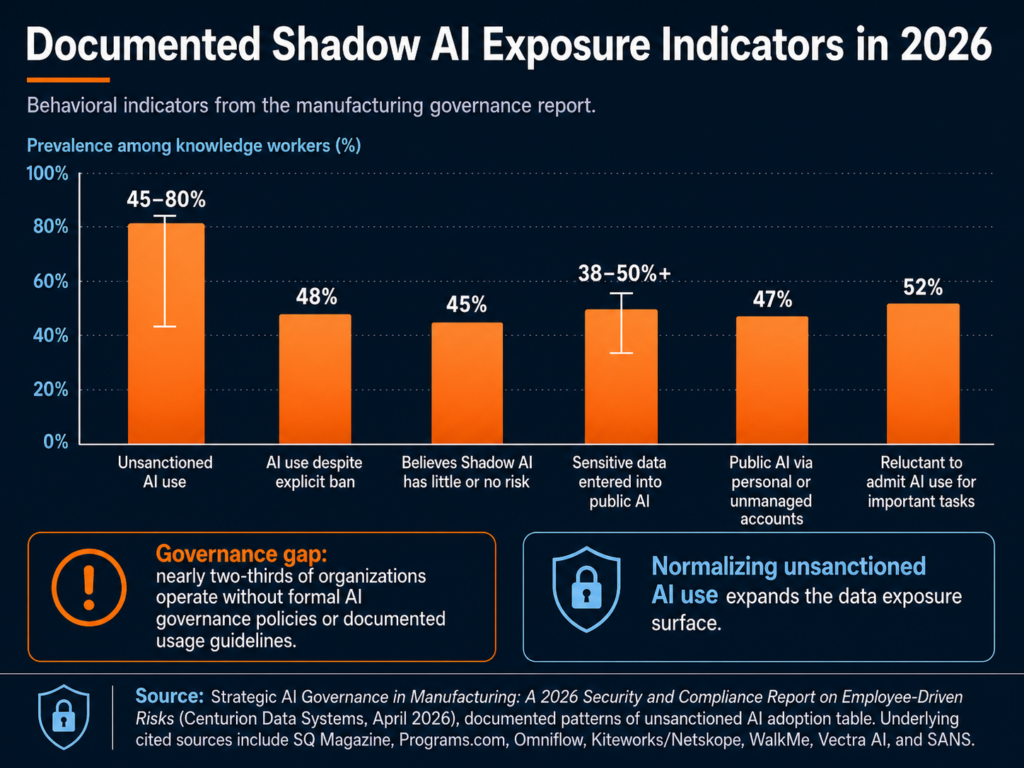
AI governance for manufacturing security is not a future planning topic anymore. It is already showing up in the daily habits of engineers, estimators, production managers, buyers, HR teams, and customer service staff.
The warning sign came early. In 2023, Samsung reportedly discovered that employees had entered sensitive company information into ChatGPT, including source code used to debug semiconductor systems and internal meeting content. Cyberhaven’s analysis later cited that incident as an example of what happens when helpful employees use public AI tools before policy catches up.
For a manufacturer, the equivalent is not hard to picture.
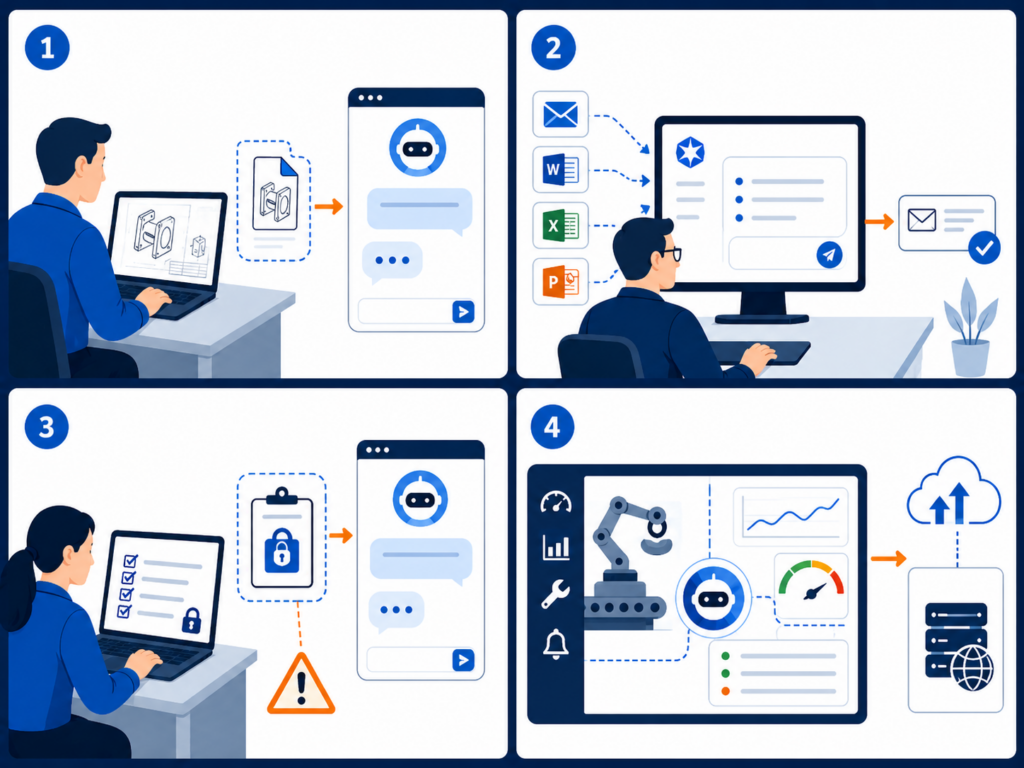
An engineer pastes a customer drawing into ChatGPT and asks it to summarize the tolerances. A project manager uploads contract language to generate a supplier checklist. A defense subcontractor copies Controlled Unclassified Information into an AI tool to rewrite a status update. A maintenance technician uses an AI browser extension to troubleshoot a recurring equipment fault and accidentally exposes production data.
Workers are not out to cause a breach, they are just trying to move faster.
That is the problem. AI is already in the workflow, but many IT policies still treat it like an optional tool instead of a new data path.
The AI Tools Already in Your Environment
Most manufacturers do not have one AI problem. They have three.
1) Sanctioned AI (IT knows about it)
This is usually Microsoft Copilot (or “Copilot Chat”) because it’s bundled into daily work: Teams, Outlook, Word, Excel.
The good news: Microsoft positions Microsoft 365 Copilot as operating within the Microsoft 365 service boundary, and states prompts/responses and Microsoft Graph data aren’t used to train the underlying foundation models.
The catch: “inside the boundary” doesn’t automatically mean “safe for your business.” If you’ve got overshared SharePoint libraries, messy permissions, weak labeling, or no retention plan for Copilot interactions, Copilot can still surface things to people who shouldn’t see them (because they already had access somewhere).
Translation: Copilot can amplify whatever content hygiene you currently have—good or bad.
2) Unsanctioned AI (IT doesn’t know about it)
This is where things get spicy:
ChatGPT / Claude / Gemini accounts created with personal emails
“Just one quick question” to a public AI website
AI browser extensions that read pages, emails, or clipboard content
Consumer “meeting notes” tools used for Teams/Zoom recaps
In manufacturing terms, 11% isn’t “a few mistakes.” It’s a steady drip of drawings, supplier details, quotes, quality issues, and customer conversations—leaving your environment one paste at a time.
3) Embedded AI (it shows up inside other tools)
Even if you block public chatbots, AI can still be “baked into” tools you already run:
ERP “AI insights” features
Maintenance diagnostics that use AI to predict failures
AI-assisted design features in engineering software
Vendor portals that now include “smart assistants”
Security tools using AI to summarize alerts
This category is easy to miss because it doesn’t look like “someone using AI.” It looks like a feature update.
The first step most teams skip: an AI usage audit
Before you write policy, you need visibility. A practical starter audit looks like:
Review M365 usage: where Copilot is enabled, for whom, and which apps
Look for “shadow AI” patterns in web proxy/DNS/firewall logs
Inventory browser extensions (managed endpoints)
Identify which SaaS/ERP/engineering tools have embedded AI features turned on
Ask department leads one blunt question: “Which AI tools are people using to do their jobs faster?”
If you don’t know what’s in use, you can’t govern it.
For a manufacturing IT director, the lesson is direct: before you can govern AI, you need to know where it is. That means approved tools, unapproved tools, browser extensions, SaaS features, vendor portals, and operational platforms.
The Compliance Angle: CMMC, CUI, Copilot, and Insurance
AI governance becomes more serious when the manufacturer handles regulated data.
For defense suppliers, the issue is not just “Should employees use AI?” The sharper question is: Can we prove that CUI is not entering AI systems that are outside our authorized environment?
If you’re a manufacturer, compliance risk from AI usually shows up in one of four places: CUI handling, tenant boundaries, insurance renewal, and frameworks you can point to when leadership asks “what good looks like.”
CUI spillage risk for DoD suppliers (CMMC reality)
If you handle CUI, you’re already living inside a rule set that expects discipline around where that information is stored, processed, and transmitted.
NIST SP 800-171 is the baseline “protect CUI in nonfederal systems” playbook many DoD contractors align to.
DoD’s CMMC Level 2 assessment guidance ties certification to regulatory requirements and assessments for those environments.
So here’s the practical problem with generative AI:
If an employee pastes CUI into an unsanctioned AI tool or uploads a controlled drawing into a consumer “AI helper”, you’ve got CUI leaving the controlled environment. Whether that becomes a reportable incident depends on your contracts and incident response requirements, but it’s never a good day.
This is why “CMMC AI tools” is becoming a real discussion internally: not because AI is banned, but because CUI boundaries are non-negotiable.
Microsoft Copilot: commercial vs. GCC / GCC High / DoD
A lot of manufacturers are in a mixed reality:
Corporate runs a commercial Microsoft 365 tenant
Defense work requires tighter controls, sometimes government cloud alignment
That does not mean Copilot is automatically unsafe. It means Microsoft Copilot manufacturing security depends on tenant type, data type, configuration, permissions, labels, logging, and user behavior.
Microsoft’s guidance on government cloud environments explicitly calls out that GCC High is intended for organizations handling CUI and that Copilot in government clouds operates within the government tenant, with prompts/responses remaining in that environment.
Also important: Microsoft states Microsoft 365 Copilot prompts/responses aren’t used to train foundation models and that Copilot only surfaces data users have permission to access.
But here’s the compliance gotcha: Even if Copilot is “secure,” your environment choice still matters. If your contract requires CUI to live in a specific enclave (and your security plan is built around that), you don’t want CUI “handled casually” in the wrong tenant just because it’s convenient.
A framework you can actually cite: NIST AI RMF
When leadership asks, “What are we aligning to?”, the NIST AI Risk Management Framework (AI RMF 1.0) gives you a credible backbone with four core functions: Govern, Map, Measure, Manage.
You don’t have to implement a big enterprise program on day one. But referencing NIST AI RMF helps you:
justify why governance is necessary,
prioritize what to tackle first,
and document decisions in a way auditors and insurers understand.
Cyber insurance: AI is starting to show up at renewal
Cyber insurance is shifting from “do you have MFA?” to “prove you can manage modern risk.” HUB International notes that cyber insurers will ask how an insured uses AI, what types of data AI tools are trained on or regularly handle, whether the company complies with AI laws and regulations, and what first- and third-party liabilities may apply.
We’re seeing more discussion of AI exclusions and “AI-connected” claim language in policies and renewals.
What does that mean for an IT Director at a manufacturer?
At renewal, don’t be surprised by questions like:
Do employees use generative AI tools for business work? Which ones?
Do you have an AI acceptable use policy your workforce is trained on?
Can you show controls for data loss prevention (DLP) and logging around AI use?
Do you review third-party AI features in SaaS tools (vendor risk)?
For many manufacturers, the honest answer is still “not yet.”
NIST gives teams a useful starting point. The NIST AI Risk Management Framework is designed to help organizations that design, develop, deploy, or use AI systems manage AI risk and support trustworthy AI use. For a small IT team, that does not have to become a 200-page governance project. It can start with inventory, classification, acceptable use, monitoring, training, and incident response.
Four Risk Scenarios That Should Feel Familiar
The risk is easier to manage when it sounds like real work instead of abstract compliance language.
1. The engineer using public AI to speed up a drawing review
An engineer receives a customer print with tight tolerances and special handling notes. The job is urgent. Instead of manually summarizing the requirements, they paste sections into a public AI tool and ask for a checklist.
The output is useful. The exposure is the problem.
That prompt may include customer IP, controlled technical data, export-sensitive information, or contract-specific requirements. If the company later needs to prove that customer data stayed inside approved systems, there may be no clean audit trail.
2. The production manager using AI to clean up a customer update
A production manager wants to write a clearer explanation for a delayed shipment. They paste the customer’s email thread, internal notes, part numbers, job status, and quality issue into an AI tool and ask it to “make this sound professional.”
The issue here is not the polished response. It is everything that went into the prompt: customer identity, production timing, defect details, order status, and potentially sensitive commercial terms.
The X-Force Threat Intelligence Index 2026 reinforces why identity and data exposure matter. X-Force found credential harvesting and data leaks were leading impacts in 2025, and attackers continued to rely on stolen credentials, misconfigured access, and weak authentication to blend into normal business activity.
3. The CMMC supplier using AI to simplify CUI-heavy language
A defense supplier receives documentation from a prime contractor. An employee copies several paragraphs into an AI assistant and asks, “Can you explain this in plain English?”
That single prompt could create a CUI handling issue. The employee did not download malware. They did not click a phishing link. They simply used a convenient tool to understand a difficult document.
This is why an AI acceptable use policy manufacturer teams can actually follow is so important. Employees need clear rules for what is allowed, what is prohibited, and what to do when they are unsure.
4. The vendor AI feature no one vetted
A maintenance platform adds an AI troubleshooting feature. A technician enters machine symptoms, downtime history, error codes, and notes from prior service calls. The vendor’s AI model returns helpful recommendations.
But was that feature reviewed? Where is the data processed? Is it used for model training? Can the vendor’s subcontractors access it? Does it create a new system where production data is stored?
X-Force warned that AI adoption broadens the attack surface and that attackers are using generative AI to speed up social engineering, reconnaissance, and attack-path iteration. The same report also found manufacturing was the most-targeted industry for the fifth consecutive year, accounting for 27.7% of incidents in 2025.
Manufacturers already have enough exposure through vendors, remote access, cloud systems, and production networks. AI adds another layer unless it is governed.
Building the Policy: Six Elements of a Minimum Viable AI Governance Program
An AI governance policy does not need to start as a legal binder. For most small and mid-sized manufacturers, the better first move is a one-page policy your team can understand and use.
Here are the six sections that belong in a practical first version.
1. Approved tools
List which AI tools employees may use. Include Copilot, approved chatbots, AI features inside business applications, and any department-specific tools. If a tool is not on the list, employees should know how to request review.
2. Prohibited data
Be specific. Do not say “do not enter sensitive data.” Say what that means: CUI, customer drawings, engineering files, source code, pricing, contracts, employee records, financials, credentials, production data, regulated personal information, and nonpublic customer communications.
3. Allowed use cases
Give employees safe examples. Drafting a generic email from non-sensitive notes may be acceptable. Summarizing public information may be acceptable. Brainstorming a maintenance checklist without machine-specific or customer-specific data may be acceptable.
4. Review process for new AI tools
Define who reviews new tools before use. IT should look at security, data retention, authentication, logging, vendor terms, integrations, and whether the tool touches regulated data. For CMMC-regulated environments, the review should also consider whether the tool is inside the right cloud boundary.
5. Monitoring and nonconformity handling
The uploaded AI governance protocol recommends treating AI policy deviations as nonconformities: contain the issue, identify root cause, remediate the system weakness, and prevent recurrence. It also warns that blaming “human error” is usually the wrong answer; the deeper issue may be lack of training, lack of approved tools, or a stalled security review.
That is the right mindset. The goal is not to punish employees for using AI. The goal is to learn where policy, tools, and training are not keeping up.
6. Training and onboarding
Add AI rules to onboarding, annual security training, engineering team briefings, and manager checklists. Keep it plain. Employees should leave training knowing three things: what they can use, what they cannot paste, and whom to ask before using a new AI tool.
The protocol also recommends tracking AI issues through a lifecycle: identified, contained, root cause in progress, action planned, implementing, awaiting verification, and closed. That gives IT and leadership evidence that AI governance is being managed, not improvised.
The Point Is Not to Stop AI
Manufacturers should not treat AI like a problem to ban. The productivity benefits are real. AI can help teams summarize information, draft communications, analyze data, improve maintenance workflows, and reduce administrative drag.
The point is to build guardrails before the first serious exposure.
For manufacturers, AI governance is now part of security, compliance, cyber insurance readiness, and customer trust. If employees are already using AI, the business needs visibility. If Copilot is being considered, permissions and tenant architecture matter. If CUI is involved, AI use needs to be treated as a compliance boundary, not just a productivity choice.
Start small: inventory the tools, write the one-page policy, train employees, monitor for shadow AI, and create a simple process for exceptions and incidents.
If your IT budget has felt “tight” the last couple of years, 2026 is not shaping up to be a relief year. Technology spending is still expanding, licensing is getting more expensive, and the cost of delivering reliable, secure IT keeps climbing. For business owners and operations leaders in Milwaukee and Waukesha evaluating managed IT services, these pressures can translate into higher internal IT overhead and higher MSP service rates as providers absorb and pass along rising costs.
Below is what’s driving the trend—and how to plan (and protect your budget) before 2026 hits.
Global IT spending is still accelerating
Major analyst firms are forecasting continued growth in worldwide IT spend into 2026:
Gartner forecasts worldwide IT spending will reach $6.08 trillion in 2026, up 9.8% year-over-year.
IDC also projects IT spending growth of about 10% in 2026 (after a very strong 2025).
When overall IT spending grows at ~10%, it’s rarely because everything got cheaper. It’s typically a mix of:
higher consumption (more SaaS, more storage, more endpoints),
and higher unit costs in key categories.
That environment is exactly where MSP pricing pressure comes from.
Licensing increases are real
Even if your environment is stable, your vendors aren’t. One of the clearest, sourced examples going into 2026:
Microsoft announced commercial Microsoft 365 pricing updates effective July 1, 2026.
Reuters reported the change broadly, including increases across multiple business and enterprise plans.
For many Milwaukee-area SMBs, Microsoft 365 is a foundational platform (identity, email, collaboration, security features). When those per-user costs move, it pushes up:
your direct licensing line item, and/or
the managed overhead required to administer the platform properly (identity, conditional access, MFA, endpoint policies, backups, etc.).
Bottom line: even “steady-state” IT stacks get more expensive when major vendors reprice core suites.
Managed services demand keeps climbing
Demand growth matters because it affects labor markets, service scope, and pricing power.
Multiple market forecasts show managed services continuing to expand through 2026:
Research Nester estimates managed services market size around $424.14B in 2026.
MarketsandMarkets projects growth from $365.33B (2024) to $511.03B (2029) (a multi-year trendline that includes 2026).
As the market expands, MSPs are expected to deliver more than “helpdesk and patches.” Clients increasingly expect:
stronger security baselines,
faster response and deeper expertise,
tighter documentation and compliance readiness,
and more proactive monitoring and automation.
That shift changes cost structure—and pricing.
AI and data-center investment is raising the baseline cost of “modern IT”
Whether you’re “doing AI” or not, the ecosystem is investing heavily in the infrastructure that supports it. This drives cost pressure across cloud platforms, hosting, and the tools MSPs use.
For example, the Financial Times highlighted projections that hyperscalers could invest hundreds of billions in data infrastructure tied to AI, including substantial spending expected in 2026.
You don’t need to buy GPUs to feel the downstream impacts. These investment cycles often coincide with:
changing cloud pricing models,
increased demand for specialized skills,
and higher costs for the tooling MSPs rely on (monitoring, backup, security, automation).
What this means in plain English for SMB IT budgets in 2026
Most organizations feel cost increases in a few predictable places:
Per-user licensing and security add-ons rise (Microsoft and others).
Reactive environments cost more than standardized, proactively managed ones.
If your IT is currently “held together by heroics,” 2026 is when that model gets brutally expensive.
5 practical moves to reduce 2026 budget shock
1) Lock down your “minimum security baseline”
Standardize identity security, endpoint protections, patching, backups, and admin access policies. The more exceptions you have, the more expensive support becomes.
2) Reduce tool sprawl before renewal season
Every redundant product costs you twice: subscription + management overhead. Consolidation is one of the fastest ways to claw back budget.
3) Get ahead of licensing changes
If Microsoft 365 is core to your business, plan now for July 2026 adjustments—especially if you have seasonal hiring or frequent license churn.
4) Shift from “hourly surprises” to predictable agreements
If you’re still relying on reactive break/fix or loosely defined support, you’re exposed. Predictability is what protects budgets.
5) Treat 2026 as a contract strategy year
Many businesses wait until renewal to negotiate. That’s the worst time. The best time is before vendor pricing and MSP demand tighten further.
Lock in 2025 rates with CDS for a limited time
If you’re planning to make a change in 2026 (or you’re already expecting budget pressure), the smart move is to get ahead of it now.
Centurion Data Systems (CDS) is offering a limited-time option to lock in 2025 managed services rates for qualified Milwaukee-area businesses.
What you get:
A straightforward review of your current environment and renewal timelines
A practical scope recommendation (no fluff, no overbuying)
A 2026-readiness plan that prioritizes cost control and risk reduction
Contact CDS to request the “2025 Rate Lock” review before the offer window closes.
As Milwaukee businesses finalize their 2026 IT budgets, now is the time to understand what you are actually paying for, and what level of support your business truly needs.
1. Why MSP Pricing Varies
Pricing of Managed IT Services for busineeses looks straightforward on paper, but in practice, no two providers package services the same way. One company quotes a flat per-user price. Another uses a mix of user, device, and infrastructure fees. One provider includes security monitoring, backups, cyber insurance documentation, and Microsoft licensing. Another provides basic support only and bills everything else on top.
The reason pricing varies is because MSPs build their services around different models. Some are designed for responsiveness and basic support. Others focus on proactive management, security maturity, compliance, and long-term planning. What you are really paying for is not just help desk coverage. You are paying for how reliable, secure, scalable, and predictable your entire IT environment will be.
A lower price may save you on paper, but businesses typically pay more over time when downtime, cybersecurity, compliance exposure, and lost productivity are factored in.
2. What Actually Drives Managed IT Support Costs
Below are the factors that have the biggest impact on what Milwaukee businesses pay for outsourced IT support:
Number of Users
Most MSPs bill per user rather than per device. This includes laptops, desktops, mobile access, and Microsoft accounts. It reflects help desk load, security coverage, licensing, and risk.
Level of Security
Basic antivirus is not enough for real protection today. Managed detection and response, endpoint security, MFA enforcement, logging, cyber insurance readiness, and threat analytics all increase cost but reduce risk dramatically.
Compliance Requirements
Healthcare, manufacturing, financial services, and legal offices face HIPAA, NIST, or CMMC demands. MSPs that can support auditing, policy documentation, and cyber insurance reporting have higher pricing tiers because the stakes are higher.
Infrastructure Complexity
A typical law office with Microsoft 365 users and two servers is very different from a manufacturer running ERP, on-prem servers, CNC machines, and segmented production networks. More complexity means more management, monitoring, and risk.
Level of Management
There is a difference between basic break-fix support and a proactive service structure with strategic planning, lifecycle budgeting, quarterly reviews, and CIO-level guidance.
Onsite Needs
Some firms rarely require physical presence. Others need engineers for warehouse, manufacturing, or medical system support. Onsite availability raises cost but adds value where it matters.
3. Typical Managed IT Pricing Ranges by Business Type
The biggest variable is not size. The real difference is whether your business wants simple support, or expects IT to actively drive efficiency, security, insurance readiness, and digital modernization.
4. Comparing Milwaukee MSP Pricing Models
Local MSPs typically follow one of these three models:
Pricing Model
What It Includes
Real Risks
Reactive / Break-Fix
You pay when something breaks
Unpredictable costs, no prevention, no roadmap
Traditional MSP
Monitoring, support, maintenance, licensing
Limited cybersecurity, compliance support, outdated help desk mentality
Most expensive monthly cost, but least expensive long term
Most Milwaukee businesses think they are buying the second model. In reality, many are receiving the first. That is often why they experience slow response, unpredictable invoices, and no reporting.
5. Getting the Best Return on Your IT Investment
The question is not what you are paying. It is what you are getting in return. That includes:
✔ Lower downtime and faster response ✔ Documented cybersecurity maturity levels ✔ Predictable budgets instead of surprise invoices ✔ Industry compliance readiness (HIPAA, NIST, cyber insurance) ✔ Clear planning for upgrades, licensing, and staffing ✔ A real partner leading technology decisions, not just reacting to them
The right outsourced IT support should reduce daily interruptions, improve security, eliminate hidden costs, and help your business plan ahead. That is where the real savings are.
6. Free 2026 Managed IT Budget Planning Report
As Milwaukee businesses finalize their 2026 technology budgets, we are offering a free benchmarking and planning assessment to help leadership understand real costs and expected returns.
Compliance affects so many aspects of a business: insurance eligibility, client retention, contracts, partnerships, and even whether you are allowed to bid on certain manufacturing or government projects. Whether you manage patient records, financial data, employee information, or vendor credentials, data protection requirements apply to your business in some form.
This guide gives you a clear view of the compliance landscape, the regulations that matter most in Wisconsin, what your business needs to do to stay compliant, and how to turn compliance from a risk into an advantage.
1. Why Compliance Matters
Compliance is not just about avoiding penalties. It is about protecting your business, safeguarding your relationships, and building trust with the clients you serve.
Here is why it matters:
Reason
What It Means in Real Life
Cyber insurance
Most policies now require MFA, backups, encryption, and recovery plans before coverage
Contract eligibility
Manufacturers, healthcare networks, and financial services often require proof of controls
Client retention
Clients increasingly ask for security questionnaires, SOC reports, or compliance attestations
Risk reduction
Strong compliance practices help prevent both cyberattacks and operational failures
Regulatory protection
HIPAA, FTC, GDPR or CMMC violations can result in heavy fines and legal action
Compliance is no longer optional for companies with sensitive data, vendor access, or regulated clients. The question is whether your systems and documentation are audit-ready.
2. Key Regulations That Milwaukee Businesses Should Understand
Not every business is governed by the same frameworks, but most fall under at least one of these:
Regulation
Who It Applies To
What It Covers
HIPAA
Medical, dental, billing, labs, insurance, managed service providers handling PHI
Protected Health Information, data handling, breach response, access control
CMMC
Manufacturers, contractors, engineering firms that work with the U.S. Department of Defense
Controlled Unclassified Information (CUI), cybersecurity maturity, documentation
GDPR
Any U.S. business holding personal data of EU citizens or processing EU transactions
Privacy rights, consent, data storage, exporting, reporting
Documented Business Associate Agreements (BAA) if applicable
Third-party access controls for maintenance providers
Incident Response & Reporting Readiness
Defined response team and communication protocol
SEC, HIPAA, DoD, FTC, or Wisconsin state breach reporting requirements
Logging and audit trails for systems and user access
You do not need to implement everything at once. But you do need a roadmap that lines up with your risk level, industry requirements, and insurance expectations.
4. Consequences of Non-Compliance
It is not just about fines. The bigger issues are financial disruption, legal exposure, and loss of reputation.
Risk
Real-World Impact
Cyber insurance claim denial
Business pays out-of-pocket for recovery, legal, and ransom costs
Lost contracts or bids
Disqualified from DoD, manufacturing, healthcare, or financial industry work
Lawsuits or regulatory penalties
HIPAA, FTC, or GDPR fines ranging from thousands to millions
Downtime and operational disruption
Lost productivity, supply chain delays, billing delays, missed deadlines
Client or partner distrust
Loss of accounts due to perceived negligence
Businesses that cannot demonstrate compliance often struggle to compete, even if they have strong operations.
5. How Centurion Helps with Compliance
We focus on practical, real-world compliance designed for Wisconsin SMBs, not enterprise-sized frameworks that do not apply.
Here is how we help:
Need
How Centurion Supports
Assessment
Compliance readiness audit with written risk report
Documentation
We help create policies, runbooks, and access logs
Tools
Backup, encryption, EDR, MFA, reporting, and vendor review
Implementation
We deploy, configure, and manage compliance tools
Testing
We schedule periodic backup and recovery testing
Evidence
Compliance documentation for cyber insurance, HIPAA, FTC, CMMC
We do not simply hand over templates. We help your business build a compliance environment that is understandable, maintainable, and audit-ready.
Get Your Compliance Readiness Review
Not sure how compliant your business actually is? Want to know what an auditor, cyber insurer, or legal contract reviewer would see?
Centurion offers a Compliance Readiness Review for Milwaukee businesses that includes:
✔ Risk assessment and compliance scoring ✔ Documentation and policy review ✔ Cyber insurance alignment and readiness analysis ✔ Gap analysis with practical, prioritized steps ✔ Compliance roadmap you can share with leadership
No pressure. No generic report. Just clarity and direction.
Milwaukee businesses are no longer asking whether cybersecurity is necessary. They are asking what level of protection is actually enough. Local manufacturers, accounting firms, clinics, contractors, real estate offices, and professional services are all being targeted. Not because they are large, but because they are accessible.
This article gives you a clear picture of today’s threat landscape, the most common risks faced by Wisconsin businesses, what protection really looks like, and how the right IT partner helps you do more than just “install antivirus.”
1. The Reality: Cyber Threats Are Rising Fast
Here are a few numbers that tell the story clearly:
Wisconsin contributed to over 8,000 cybercrime complaints in 2024, resulting in more than 36 million dollars in reported losses, according to the FBI’s Internet Crime Report.
Nationally, cyberattacks against small and mid-sized businesses rose 22 percent in 2024, with ransomware being the number one driver.
Nearly 60 percent of SMBs that suffer a major cybersecurity incident fail within six months, according to the National Cybersecurity Alliance.
The average ransomware payment for U.S. businesses in 2025 climbed to $122,000, not including recovery and downtime costs.
Cyberattacks are no longer isolated IT issues. They affect operations, insurance eligibility, reputation, client retention, and regulatory compliance. In today’s climate, cybersecurity is risk management.
2. The Most Common Cybersecurity Threats Affecting Milwaukee Businesses
While national news covers massive data breaches, local businesses experience a different set of threats. Here are the most common in Wisconsin:
Local Threat
How It Impacts Businesses
Ransomware
Locks systems, halts production, demands payment to regain access
Phishing and Business Email Compromise
Fake invoices, CEO impersonation, payroll diversion, vendor fraud
Cloud account takeover
Stolen Microsoft 365 credentials used to access email, SharePoint, or OneDrive
Outdated servers, firewalls, or Windows 10 machines
Unsupported systems with no security patches, often uninsured
“Shadow IT” tools used by staff
Unapproved apps create security holes and violate insurance policy requirements
Data breaches from vendors
Third-party tools or contractors exposing sensitive information
Two trends are clear: attackers are using familiar methods, and human behavior is often the entry point. That is why cybersecurity is not just technology. It is monitoring, policy, training, and preparedness.
3. Essential Security Measures Every Milwaukee SMB Should Have
Not every business needs enterprise-level cybersecurity, but every business needs protection that aligns with their size, risk-level, insurance requirements, and client expectations.
Here are the foundational layers that should be in place:
Identity Protection (Who gets in)
Multi-factor authentication (MFA) on email, VPN, servers, and apps
Conditional access or least-privilege controls
Password management policies and enforcement
Endpoint Protection (What runs on your devices)
AI-driven endpoint detection and response (EDR) like SentinelOne or Huntress
Remote isolation for compromised machines
Automated rollback for ransomware events
Data Protection
Regularly tested backups, both local and off-site
Immutable backups that cannot be altered or encrypted
Clear recovery time and recovery point objectives (RTO/RPO)
Email and Cloud Security
Advanced threat scanning, impersonation detection, and quarantine
Domain-level protection through DMARC, DKIM, and SPF
Logs and analytics for Microsoft 365 and Google Workspace
Network Security
Business-grade firewalls with threat detection and monitoring
Zero Trust or network segmentation where applicable
Encrypted remote access with identity verification
Human Awareness
Ongoing phishing simulations and staff training
Executive awareness and policy enforcement
Cyber insurance alignment so protections match policy requirements
Cybersecurity is no longer one layer at a time. Real protection means these controls work together.
4. How MSPs Actually Help with Cybersecurity
A mature MSP is not just “the IT help desk.” It functions as a cybersecurity partner.
Here is where that becomes tangible:
They monitor threats in real time across endpoints, servers, cloud apps, firewalls, backups, and logs.
They help you meet cyber insurance, HIPAA, NIST, or other compliance requirements.
They provide documentation, risk scoring, and security posture reports.
They lead disaster recovery and coordinate with insurance, legal, and technology vendors during incidents.
They test backups and recovery rather than hoping they work.
They update security tools and policies before attackers exploit them.
The real value is not only the tools they deploy. It is the way they help you understand your risk, reduce it, and prepare for it.
5. Why Centurion’s Security Approach Stands Out
Most MSPs offer basic cybersecurity. Centurion builds structured protection around these specific goals:
Challenge
Centurion’s Approach
“We do not know our real risk.”
Documented Security Posture Assessment and Risk Score
“I worry backups might not actually work.”
Scheduled recovery tests, not just backup reports
“How would we explain this to insurance or regulators?”
Compliance-ready policies, logging, and reporting
“We do not want tools with no visibility.”
Monthly risk dashboards with event logs and insight
“We need real human response, not just alerts.”
Milwaukee-based response team with defined escalation paths
We use advanced tools like Huntress, SentinelOne, Proofpoint, ThreatLocker, Datto, and Microsoft Defender for Business, layered with monitoring, documentation, and people who know your business.
That combination is what matters. Technology alone does not protect. Strategy does.
Get a Security Posture Review
Cybersecurity does not have to be overwhelming. You do not need to solve everything at once. You need to start with clarity.
That is why we offer a Cybersecurity Assessment (Security Posture Review) for Milwaukee businesses that includes:
✔ Assessment of your current security controls and gaps ✔ Practical risk score with no technical jargon ✔ Review of insurance requirements and readiness ✔ Written roadmap of your most cost-effective upgrades ✔ No obligation and no disruption to your systems
You will receive a plain-language report your leadership team can actually understand and use.